

Why is the world so obsessed with data? With how active people are on the internet today, there are hundreds of contact points between a business and a customer. This means more digital footprints.
Customer data is often overwhelming if you try to analyze everything. The point isn’t that. It’s about finding their shopping patterns and segmenting them into different profiles.
Is your customer more active on WhatsApp or Messenger for product queries? Are they quick decision-makers or do they hesitate every time they reach the checkout section?
Shopify metrics are supposed to lead you to the answers to these questions. Then, by using shopify marketing analytics, you can design offerings, promotions, or campaigns for them.
The difference between the response rate then and now will surprise you. You also find our where your next wins are. All you need to do is to accurately measure shopify performance. Doesn’t matter if you are running paid ads, email campaigns. Or social commerce channels.
Why Shopify Marketing Analytics Matters
Every click, cart, and checkout has a story behind it. Without analytics, you’re essentially flying blind. But with analytics -
You know which channels generate the most revenue
You can optimize spending instead of guessing
You detect early warning signs before they become problems
You understand customer behaviour across devices and channels
Investing in shopify marketing analytics increases your likelihood of hitting growth targets faster. For all merchants out there, regardless of the size of your business, you should know how to measure shopify performance.
Key Shopify Marketing Analytics to Track
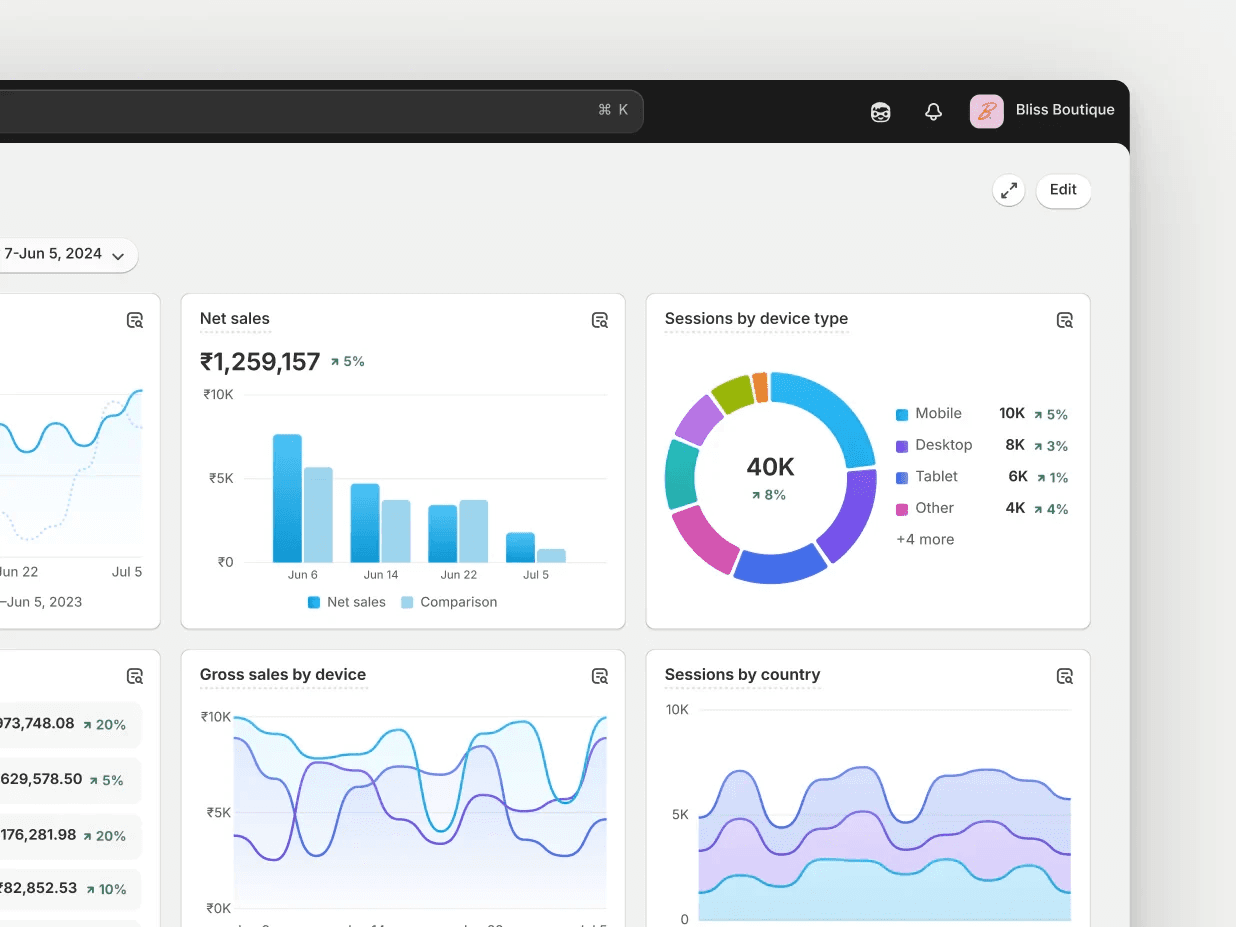
Let’s break down the essential shopify metrics that tell you whether your marketing efforts are truly paying off.
1. Traffic Sources & Channel Performance
Understanding where your traffic comes from, such as direct, organic, paid, social, referral, and email, allows you to allocate budget and effort strategically. For example, if organic search drives 40% of revenue but PPC only 10%, shifting spend makes sense.
Helpful metrics to monitor include -
Sessions per channel
Revenue per channel
Bounce rate by channel
When you track these shopify metrics, you will find the answer to the critical question: which channels are worth investing in?
2. Conversion Rate
Conversion rate shows the percentage of visitors who complete a desired action, like purchasing. A high conversion rate means your user experience, messaging, and offers are resonating well.
Shopify’s default report dashboard shows your overall conversion rate, but the real power comes from segmenting it by -
Device type like mobile vs. desktop
Traffic source
Landing page
Improving conversion rates by even a few percentage points can dramatically boost revenue without increasing traffic. And these improvements reinforce future strategies.
3. Average Order Value (AOV)
Average Order Value tells you how much customers spend on average per checkout. It’s one of the most critical shopify metrics because increasing AOV directly impacts revenue without raising acquisition costs.
Measuring AOV helps you evaluate the effectiveness of pricing and promotion strategies. You can influence AOV using -
Bundle products
Offer tiered discounts
Upsell at checkout
4. Customer Lifetime Value (CLV)
We all want our customers for life. But it’s not that easy for people to make that commitment.
Customer Lifetime Value calculates the total revenue a customer is expected to generate over their relationship with your brand. It’s one of the most important Shopify marketing analytics because it helps you decide how much you can spend to acquire a customer and still be profitable.
A growing CLV is often a sign of strong loyalty programs, repeat purchases, and effective retention strategies.
5. Retention and Repeat Purchase Rate
Retention rate measures how many customers return to buy again. Repeat buyers spend up to 3x more than first-time buyers, on average.
Tracking repeat purchase behavior helps you craft targeted loyalty campaigns and measure Shopify performance in terms of long-term revenue rather than just initial sales.
How to Measure Shopify Performance: Tools & Techniques
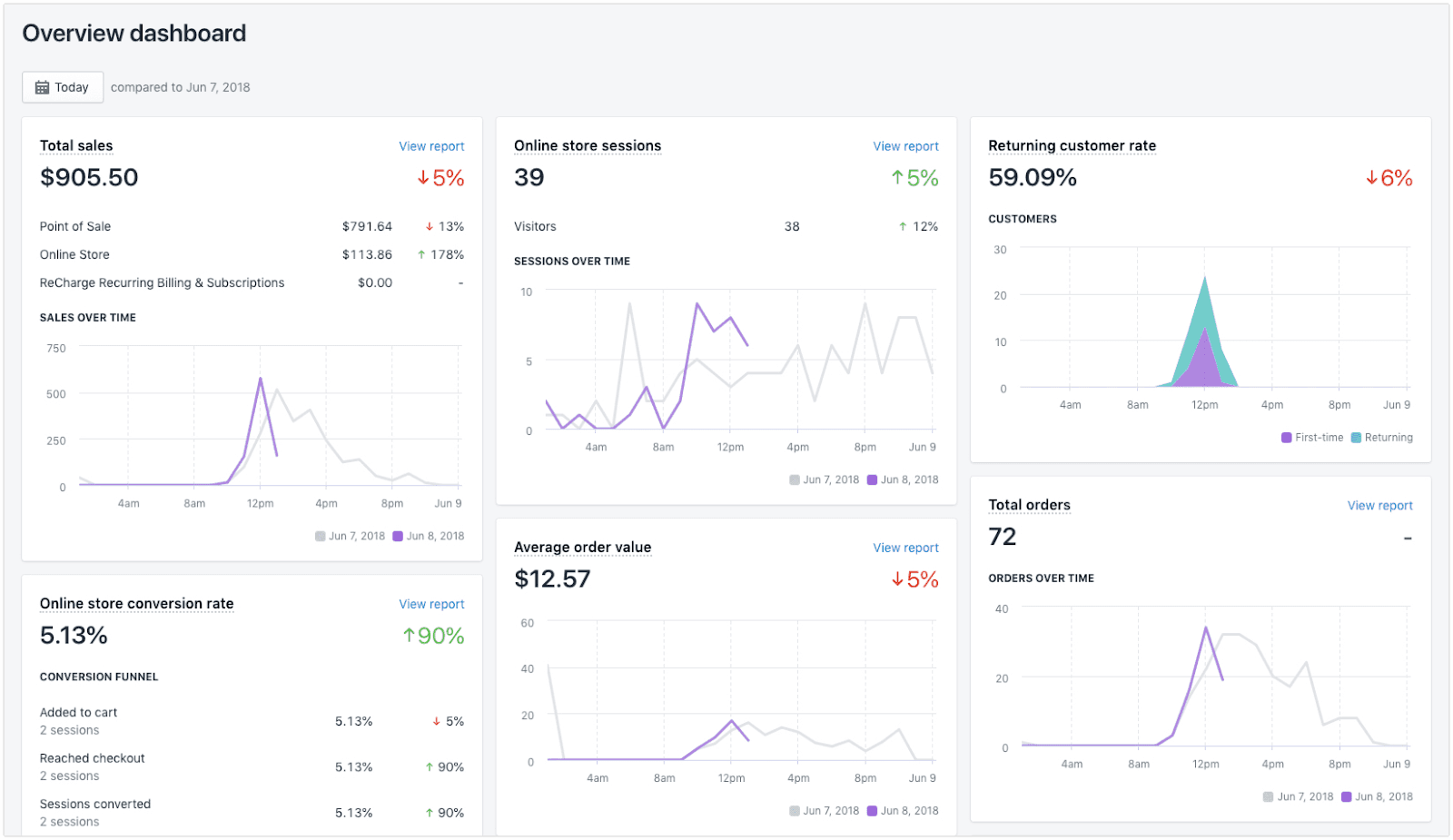
Shopify includes built-in analytics. But to go beyond the typical insights, you can use integrated reporting tools and external platforms. How do you dig deeper?
1. Shopify Analytics Dashboard
Shopify’s built-in dashboard gives you quick visibility into -
Sales over time
Average order value
Top products
Customer behavior
It’s a good starting point to understand broad trends.
2. Google Analytics (GA4)
Integrating Google Analytics with Shopify adds multi-touch attribution, audience behavior paths, and cross-device tracking. GA4’s event-based model helps you understand how specific actions contribute to revenue.
This can give access to -
Acquisition reports
Engagement metrics
Conversion paths
These help you craft a complete customer journey with less friction.
3. UTM Tracking for Campaign Insights
When you run email, social, or paid campaigns, use UTM parameters to track performance. This enables you to answer questions like -
Which email campaign led to the highest revenue?
Did the latest TikTok ad outperform Facebook in overall ROI?
UTM tagging empowers precise Shopify marketing analytics, helping you connect campaigns to conversions.
4. AI-Powered Solutions
Aside from the whole AI bubble thing, it’s fair enough to say that AI has been integrated into a lot of aspects of modern-day businesses. E-commerce brands are increasingly moving towards AI-powered tools because they are reliable in identifying customer patterns and conducting advanced analysis.
For instance, the AI-powered tool Markopolo has saved millions of dollars for its clients by knowing how to effectively profile customers, personalize messaging, and design better marketing solutions.
Big platforms like Salesforce or HubSpot now use AI as well. Bubble or not, times have changed and you should too by adopting these solutions.
How to Conduct Advanced Analytics?
Basic shopify marketing analytics can only take you so far. To be ahead of competitors, you need to gain an upperhand.
1. Cohort Analysis
Track groups of customers who purchased in the same period to see how their behavior evolves. This reveals whether promotions, product launches, or seasonal trends impact customer engagement.
2. Predictive Analytics & Forecasting
More advanced analytics platforms use machine learning to forecast revenue, churn risk, and future purchase likelihood. This transforms raw shopify metrics into strategic foresight.
3. Competitor & Benchmark Analysis
Comparing your key metrics against industry benchmarks helps you understand where you stand regionally or by category. Tools like SimilarWeb or industry reports add context to your performance data.
Optimizing Based on Shopify Analytics Insights
We can talk about tools and what metrics to focus on all day. But it will boil down to nothing without actions. Here’s how to convert insights into growth -
Double down on top channels that deliver high revenue with low CAC
Improve low-performing landing pages with better UX or messaging
Segment audiences to tailor promotions and messaging
Refine pricing and bundles based on AOV patterns
Enhance retention with personalized post-purchase flows
FAQs
1. What is Shopify marketing analytics?
Shopify marketing analytics refers to the tools and reports that help merchants track performance across channels, customers, and campaigns, measuring what drives revenue.
2. What are important Shopify metrics to monitor?
Key Shopify metrics include conversion rate, average order value (AOV), customer lifetime value (CLV), retention rate, and revenue per channel.
3. How can I measure Shopify performance accurately?
You can measure Shopify performance through the Shopify dashboard, Google Analytics (GA4), UTM tracking on campaigns, and advanced cohort and attribution analysis.
4. Why is cohort analysis useful?
Cohort analysis reveals patterns over time, showing how different customer groups behave after initial purchase. It’s crucial for retention optimization.
5. How do I track revenue by marketing channel?By using UTMs, multi-touch attribution models, and channel revenue breakdown reports in Shopify and GA4, you can determine which channels contribute most to revenue.
"/><stop offset="1" stop-color="rgba(0, 0, 0, 0)"/></linearGradient></defs><path d="M 118.813 12.145 C 119.259 11.646 119.758 11.228 120.312 10.892 C 121.232 10.339 122.33 10.064 123.605 10.064 C 124.96 10.064 126.149 10.319 127.175 10.832 C 128.213 11.345 129.081 12.081 129.778 13.041 C 130.488 13.988 131.021 15.125 131.376 16.453 C 131.731 17.781 131.908 19.253 131.908 20.87 L 131.908 21.284 C 131.908 22.836 131.731 24.276 131.376 25.604 C 131.021 26.931 130.495 28.088 129.798 29.074 C 129.101 30.06 128.234 30.83 127.195 31.382 C 126.17 31.921 124.979 32.19 123.625 32.19 C 122.35 32.19 121.252 31.908 120.332 31.343 C 119.769 30.997 119.263 30.569 118.813 30.061 L 118.813 40 L 112.167 40 L 112.167 10.064 L 118.813 10.064 Z M 44.55 10.021 C 46.107 10.021 47.496 10.28 48.716 10.8 C 49.947 11.319 50.92 12.099 51.633 13.139 C 52.345 14.166 52.701 15.459 52.701 17.018 L 52.701 25.048 C 52.701 26.329 52.774 27.302 52.919 27.967 C 53.064 28.62 53.269 29.864 53.534 30.359 L 47.481 30.359 C 47.24 29.856 47.001 29.008 46.844 28.235 C 46.64 28.489 46.413 28.732 46.162 28.963 C 45.715 29.374 45.166 29.713 44.514 29.979 C 43.862 30.232 43.07 30.359 42.141 30.359 C 40.933 30.359 40.141 30.112 39.127 29.616 C 38.125 29.121 37.322 28.432 36.718 27.55 C 36.114 26.656 35.813 25.628 35.813 24.468 C 35.813 23.453 35.994 22.547 36.356 21.749 C 36.731 20.952 37.291 20.275 38.04 19.719 C 38.789 19.163 39.424 18.74 40.583 18.45 C 41.742 18.16 43.107 18.015 44.677 18.015 L 46.56 18.015 L 46.56 16.981 C 46.56 16.426 46.482 15.949 46.325 15.55 C 46.168 15.151 45.921 14.843 45.583 14.625 C 45.245 14.396 44.792 14.28 44.225 14.28 C 43.766 14.28 43.373 14.36 43.047 14.517 C 42.721 14.674 42.473 14.909 42.304 15.224 C 42.135 15.538 42.051 15.937 42.051 16.42 L 35.946 16.42 C 35.946 15.514 36.146 14.674 36.544 13.9 C 36.955 13.115 37.535 12.432 38.283 11.852 C 39.044 11.272 39.95 10.825 41 10.511 C 42.063 10.185 43.246 10.021 44.55 10.021 Z M 20.333 16.818 L 20.333 10.064 L 27.391 10.064 L 33.96 16.824 L 33.96 30.357 L 27.391 30.357 L 27.391 16.824 L 20.338 16.824 L 20.338 30.357 L 13.77 30.357 L 13.77 16.824 L 6.712 16.824 L 6.712 30.357 L 0 30.357 L 0 16.824 L 6.712 16.824 L 6.712 10.064 L 13.77 10.064 Z M 66.509 10.021 C 66.837 10.021 67.159 10.041 67.475 10.08 C 67.803 10.12 68.093 10.179 68.343 10.258 L 68.225 16.431 C 67.962 16.404 67.606 16.372 67.159 16.332 C 66.712 16.293 66.338 16.273 66.035 16.273 C 65.26 16.273 64.589 16.365 64.023 16.549 C 63.471 16.72 63.012 16.983 62.644 17.338 C 62.394 17.578 62.191 17.864 62.032 18.194 L 62.032 30.328 L 55.386 30.328 L 55.386 10.08 L 62.032 10.08 L 62.032 12.789 C 62.046 12.767 62.058 12.745 62.071 12.723 C 62.597 11.855 63.235 11.191 63.984 10.731 C 64.734 10.257 65.575 10.021 66.509 10.021 Z M 100.855 9.999 C 102.399 9.999 103.757 10.252 104.927 10.759 C 106.109 11.254 107.098 11.948 107.895 12.842 C 108.691 13.735 109.294 14.791 109.704 16.011 C 110.114 17.218 110.319 18.54 110.319 19.977 L 110.319 20.356 C 110.319 21.781 110.114 23.103 109.704 24.322 C 109.294 25.529 108.691 26.586 107.895 27.491 C 107.098 28.384 106.114 29.078 104.944 29.573 C 103.774 30.068 102.423 30.315 100.892 30.315 C 99.359 30.315 98.002 30.068 96.819 29.573 C 95.637 29.078 94.649 28.384 93.852 27.491 C 93.056 26.586 92.453 25.529 92.043 24.322 C 91.633 23.103 91.428 21.781 91.428 20.356 L 91.428 19.977 C 91.428 18.54 91.633 17.218 92.043 16.011 C 92.453 14.791 93.056 13.735 93.852 12.842 C 94.649 11.948 95.632 11.254 96.802 10.759 C 97.972 10.252 99.323 9.999 100.855 9.999 Z M 143.199 9.999 C 144.743 9.999 146.1 10.252 147.271 10.759 C 148.453 11.254 149.442 11.948 150.238 12.842 C 151.034 13.735 151.638 14.791 152.048 16.011 C 152.458 17.218 152.663 18.54 152.663 19.977 L 152.663 20.356 C 152.663 21.781 152.458 23.103 152.048 24.322 C 151.638 25.529 151.034 26.586 150.238 27.491 C 149.442 28.384 148.459 29.078 147.289 29.573 C 146.119 30.068 144.767 30.315 143.235 30.315 C 141.703 30.315 140.346 30.068 139.164 29.573 C 137.982 29.078 136.992 28.384 136.196 27.491 C 135.4 26.586 134.797 25.529 134.387 24.322 C 133.977 23.103 133.771 21.781 133.771 20.356 L 133.771 19.977 C 133.771 18.54 133.977 17.218 134.387 16.011 C 134.797 14.791 135.4 13.735 136.196 12.842 C 136.992 11.948 137.975 11.254 139.146 10.759 C 140.316 10.252 141.667 9.999 143.199 9.999 Z M 172.449 9.999 C 173.993 9.999 175.35 10.252 176.521 10.759 C 177.703 11.254 178.692 11.948 179.488 12.842 C 180.284 13.735 180.888 14.791 181.298 16.011 C 181.708 17.218 181.913 18.54 181.913 19.977 L 181.913 20.356 C 181.913 21.781 181.708 23.103 181.298 24.322 C 180.888 25.529 180.284 26.586 179.488 27.491 C 178.692 28.384 177.709 29.078 176.539 29.573 C 175.369 30.068 174.017 30.315 172.485 30.315 C 170.953 30.315 169.596 30.068 168.414 29.573 C 167.232 29.078 166.242 28.384 165.446 27.491 C 164.65 26.586 164.047 25.529 163.637 24.322 C 163.227 23.103 163.021 21.781 163.021 20.356 L 163.021 19.977 C 163.021 18.54 163.227 17.218 163.637 16.011 C 164.047 14.791 164.65 13.735 165.446 12.842 C 166.242 11.948 167.225 11.254 168.396 10.759 C 169.566 10.252 170.917 9.999 172.449 9.999 Z M 161.166 30.313 L 154.5 30.313 L 154.5 0.021 L 161.166 0.021 Z M 76.845 16.077 L 77.515 15.205 L 81.612 10.073 L 89.579 10.073 L 82.959 17.81 L 89.579 30.311 L 81.967 30.311 L 78.53 22.531 L 76.845 24.218 L 76.845 30.311 L 70.198 30.311 L 70.198 0 L 76.845 0 Z M 121.949 15.19 C 121.239 15.19 120.641 15.303 120.154 15.526 C 119.681 15.737 119.3 16.065 119.011 16.512 C 118.94 16.623 118.874 16.743 118.813 16.869 L 118.813 25.284 C 119.04 25.75 119.348 26.133 119.74 26.432 C 120.292 26.852 121.042 27.063 121.988 27.063 C 122.619 27.063 123.146 26.918 123.566 26.629 C 123.987 26.327 124.323 25.913 124.572 25.387 C 124.822 24.848 124.999 24.23 125.104 23.533 C 125.21 22.836 125.262 22.086 125.262 21.284 L 125.262 20.87 C 125.262 20.042 125.203 19.286 125.085 18.603 C 124.967 17.906 124.776 17.301 124.513 16.788 C 124.263 16.275 123.928 15.881 123.507 15.605 C 123.086 15.329 122.567 15.191 121.949 15.19 Z M 44.641 21.277 C 44.073 21.277 43.59 21.357 43.191 21.514 C 42.805 21.671 42.491 21.888 42.25 22.166 C 42.021 22.432 41.851 22.734 41.742 23.072 C 41.646 23.411 41.598 23.767 41.598 24.142 C 41.598 24.504 41.683 24.83 41.852 25.12 C 42.033 25.398 42.274 25.616 42.576 25.773 C 42.878 25.93 43.216 26.009 43.59 26.009 C 44.266 26.009 44.84 25.882 45.31 25.628 C 45.794 25.362 46.162 25.042 46.416 24.667 C 46.47 24.587 46.518 24.507 46.56 24.429 L 46.56 21.277 Z M 100.855 14.707 C 100.216 14.707 99.679 14.846 99.245 15.123 C 98.823 15.401 98.485 15.787 98.231 16.282 C 97.978 16.765 97.797 17.326 97.688 17.966 C 97.58 18.594 97.525 19.264 97.525 19.977 L 97.525 20.356 C 97.525 21.093 97.58 21.781 97.688 22.421 C 97.797 23.061 97.978 23.622 98.231 24.104 C 98.485 24.575 98.828 24.943 99.263 25.209 C 99.697 25.475 100.24 25.607 100.892 25.607 C 101.531 25.607 102.061 25.474 102.483 25.209 C 102.918 24.943 103.262 24.575 103.516 24.104 C 103.769 23.622 103.95 23.06 104.059 22.421 C 104.167 21.781 104.221 21.093 104.221 20.356 L 104.221 19.977 C 104.221 19.264 104.167 18.594 104.059 17.966 C 103.95 17.326 103.769 16.765 103.516 16.282 C 103.262 15.787 102.918 15.401 102.483 15.123 C 102.049 14.846 101.507 14.707 100.855 14.707 Z M 143.199 14.707 C 142.56 14.707 142.023 14.845 141.589 15.123 C 141.167 15.401 140.829 15.787 140.575 16.282 C 140.322 16.765 140.141 17.326 140.032 17.966 C 139.924 18.594 139.869 19.264 139.869 19.977 L 139.869 20.356 C 139.869 21.093 139.924 21.781 140.032 22.421 C 140.141 23.061 140.322 23.622 140.575 24.104 C 140.828 24.575 141.172 24.943 141.606 25.209 C 142.041 25.475 142.584 25.607 143.235 25.607 C 143.875 25.607 144.405 25.474 144.827 25.209 C 145.261 24.943 145.606 24.575 145.859 24.104 C 146.113 23.622 146.294 23.06 146.402 22.421 C 146.511 21.781 146.564 21.093 146.564 20.356 L 146.564 19.977 C 146.564 19.264 146.511 18.594 146.402 17.966 C 146.294 17.326 146.113 16.765 145.859 16.282 C 145.606 15.787 145.261 15.401 144.827 15.123 C 144.393 14.846 143.85 14.707 143.199 14.707 Z M 172.449 14.707 C 171.81 14.707 171.273 14.845 170.839 15.123 C 170.417 15.401 170.079 15.787 169.825 16.282 C 169.572 16.765 169.391 17.326 169.282 17.966 C 169.174 18.594 169.119 19.264 169.119 19.977 L 169.119 20.356 C 169.119 21.093 169.174 21.781 169.282 22.421 C 169.391 23.061 169.572 23.622 169.825 24.104 C 170.078 24.575 170.422 24.943 170.856 25.209 C 171.291 25.475 171.834 25.607 172.485 25.607 C 173.125 25.607 173.656 25.474 174.078 25.209 C 174.512 24.943 174.856 24.575 175.109 24.104 C 175.363 23.622 175.544 23.06 175.652 22.421 C 175.761 21.781 175.814 21.093 175.814 20.356 L 175.814 19.977 C 175.814 19.264 175.761 18.594 175.652 17.966 C 175.544 17.326 175.363 16.765 175.109 16.282 C 174.856 15.787 174.512 15.401 174.078 15.123 C 173.644 14.845 173.101 14.707 172.449 14.707 Z M 3.181 10.064 C 3.279 10.881 3.572 11.608 4.156 12.195 C 4.741 12.789 5.456 13.117 6.294 13.232 C 5.473 13.359 4.756 13.67 4.174 14.261 C 3.586 14.854 3.279 15.577 3.178 16.412 C 3.062 15.577 2.756 14.845 2.16 14.252 C 1.567 13.659 0.841 13.339 0 13.247 L 0 13.244 C 1.841 12.953 2.881 11.893 3.181 10.064 Z" fill="url(%23cN2V3Wxam-866808648-linear-gradient)" height="40.00000040435791px" id="cN2V3Wxam" width="181.91299609375002px"/></svg>)