How to Automate Email Marketing for eCommerce: Strategies, Campaign Examples, KPIs, and Best Practices
Sirazum Monir Osmani
For eCommerce businesses, email marketing automation means the use of software to send triggered, personalized emails automatically based on customer behavior. These behaviors include signing up, browsing products, abandoning cart, or making a purchase. It helps online stores engage shoppers at the right moment without manually sending each message.
Want to automate email marketing for your eCommerce store?
Markopolo AI lets you build email automation flows for your eCommerce brand for free
No credit card needed

How to automate email marketing for eCommerce?
To build ecommerce email marketing automation, start with reliable customer data, define the logic behind each workflow, and launch the highest-impact flows first. Writing emails should come after you know who enters the automation, what should happen next, and when the workflow should stop.
Step 1: Connect customer and product data
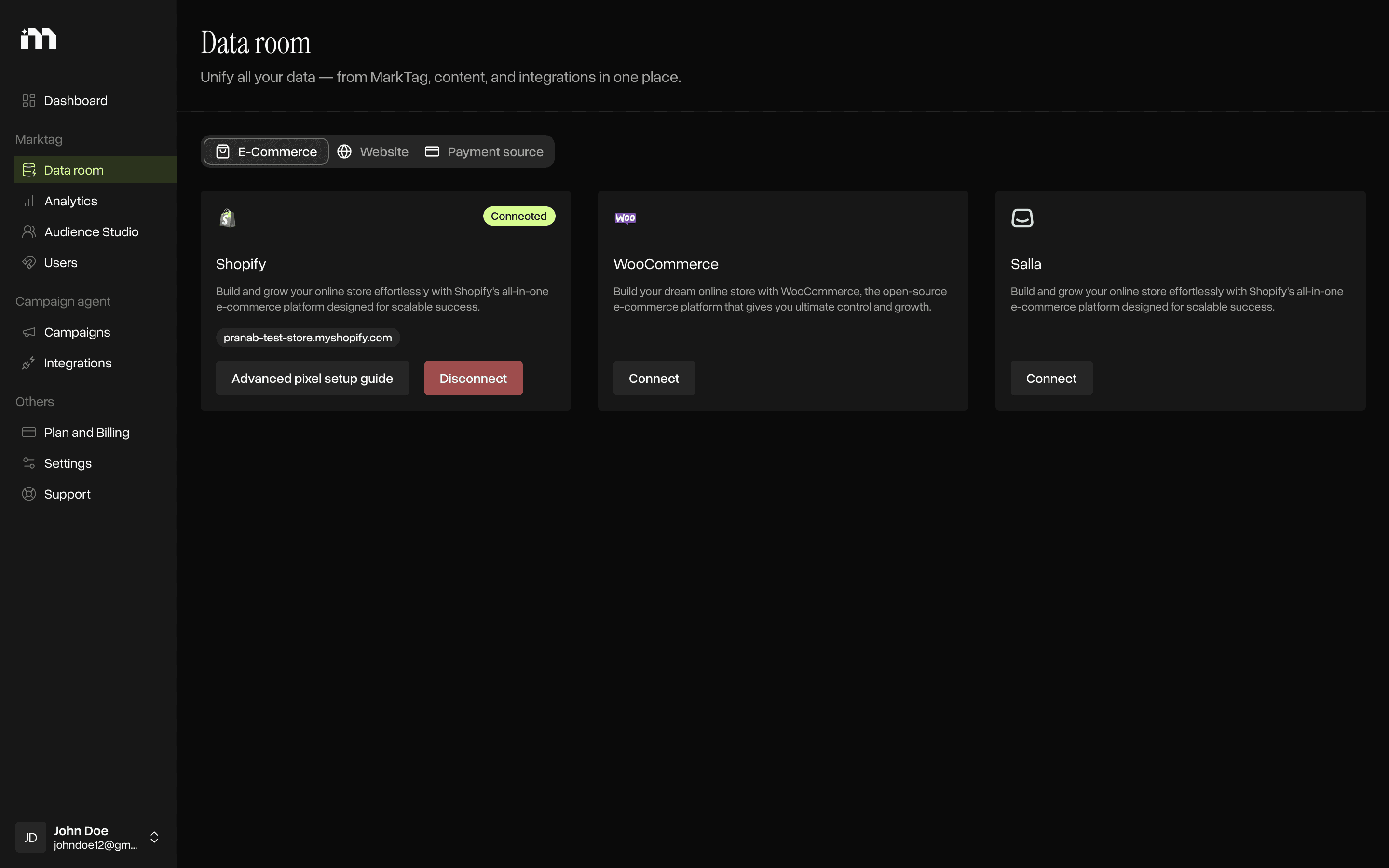
Connect your eCommerce platform to the email marketing platform so customer actions and product information pass between them accurately. The system should receive events such as:
Email signup
Product viewed
Cart created
Checkout started
Order completed
Product purchased
Last purchase date
Synchronize the product catalog so emails can display accurate product names, images, prices, links, and availability. You should also confirm that consent status is recorded correctly and that sender authentication is configured before launching promotional automations.
The right email marketing automation platform for eCommerce should support reliable event tracking, product-catalog synchronization, consent management, segmentation, and reporting without forcing your team to connect these capabilities manually.
Step 2: Define each flow before writing emails
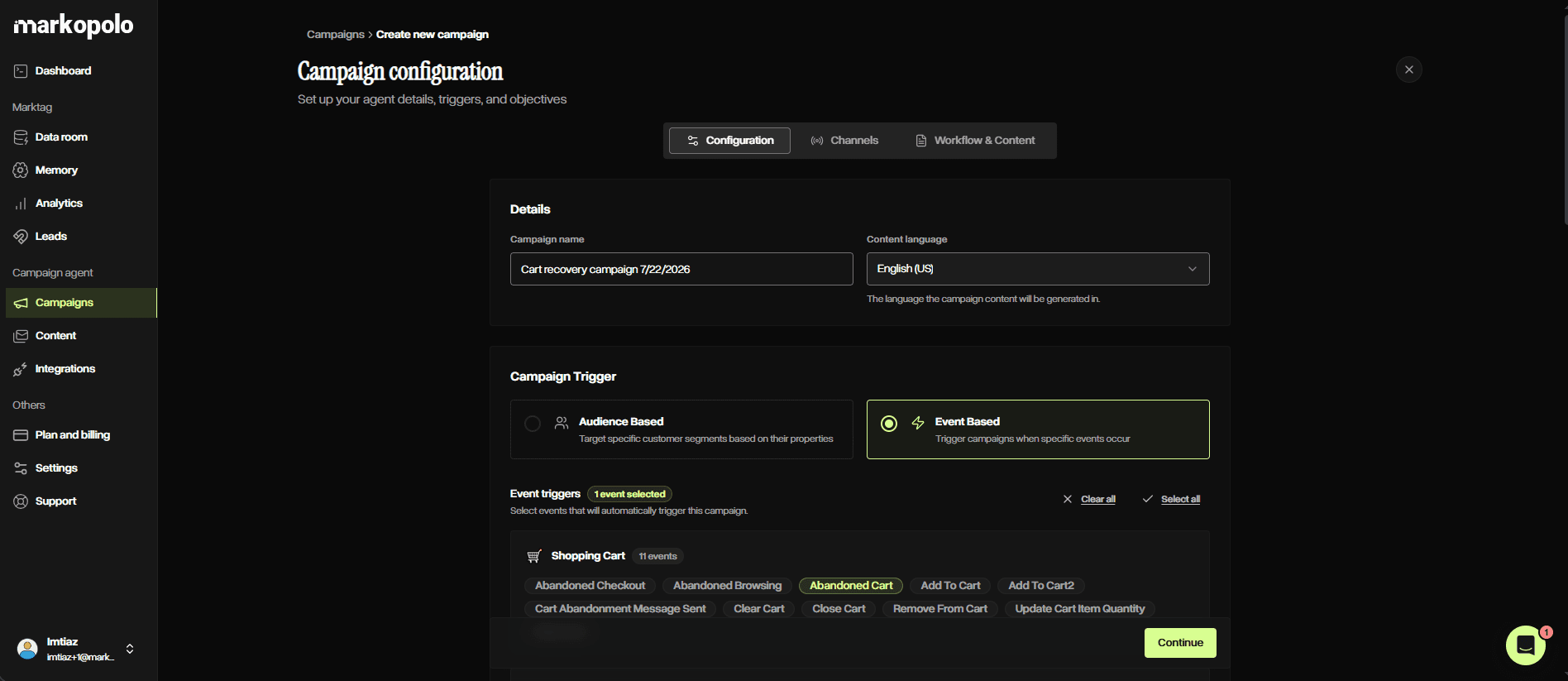
Document the automation logic before creating subject lines, copy, or designs. For every flow, define:
Trigger
Target segment
Goal
Number of messages
Delay between messages
Branching conditions
Exit condition
Success metric
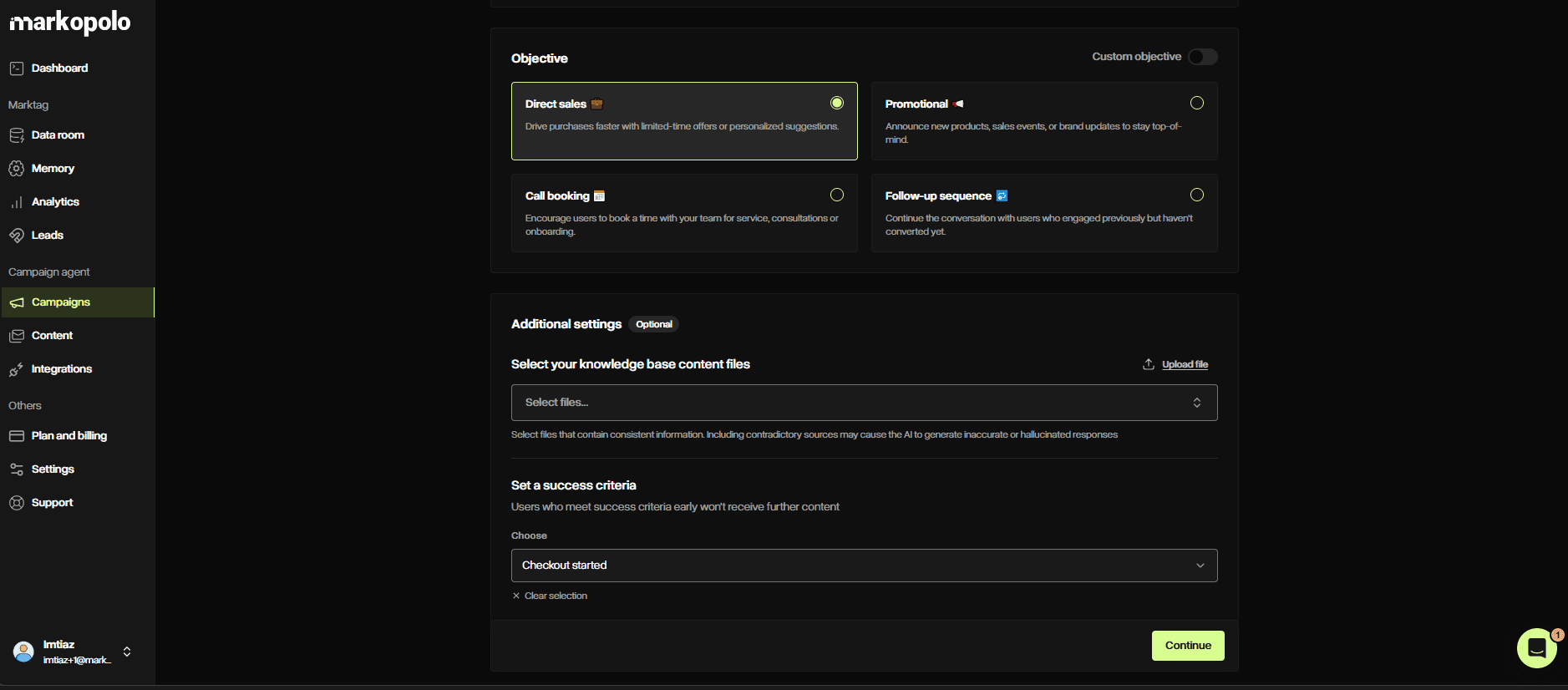
This prevents customers from receiving irrelevant or repetitive messages. For example, a cart-abandonment flow should specify when someone enters, how long the automation waits, whether different customer groups receive different messages, and how quickly purchasers are removed.
Step 3: Launch automations flows by priority
A practical implementation order is:
Welcome automation
Cart-abandonment automation
Post-purchase automation
Win-back automation
Replenishment or browse-abandonment automation
This order captures immediate conversion and retention opportunities before adding more specialized workflows.
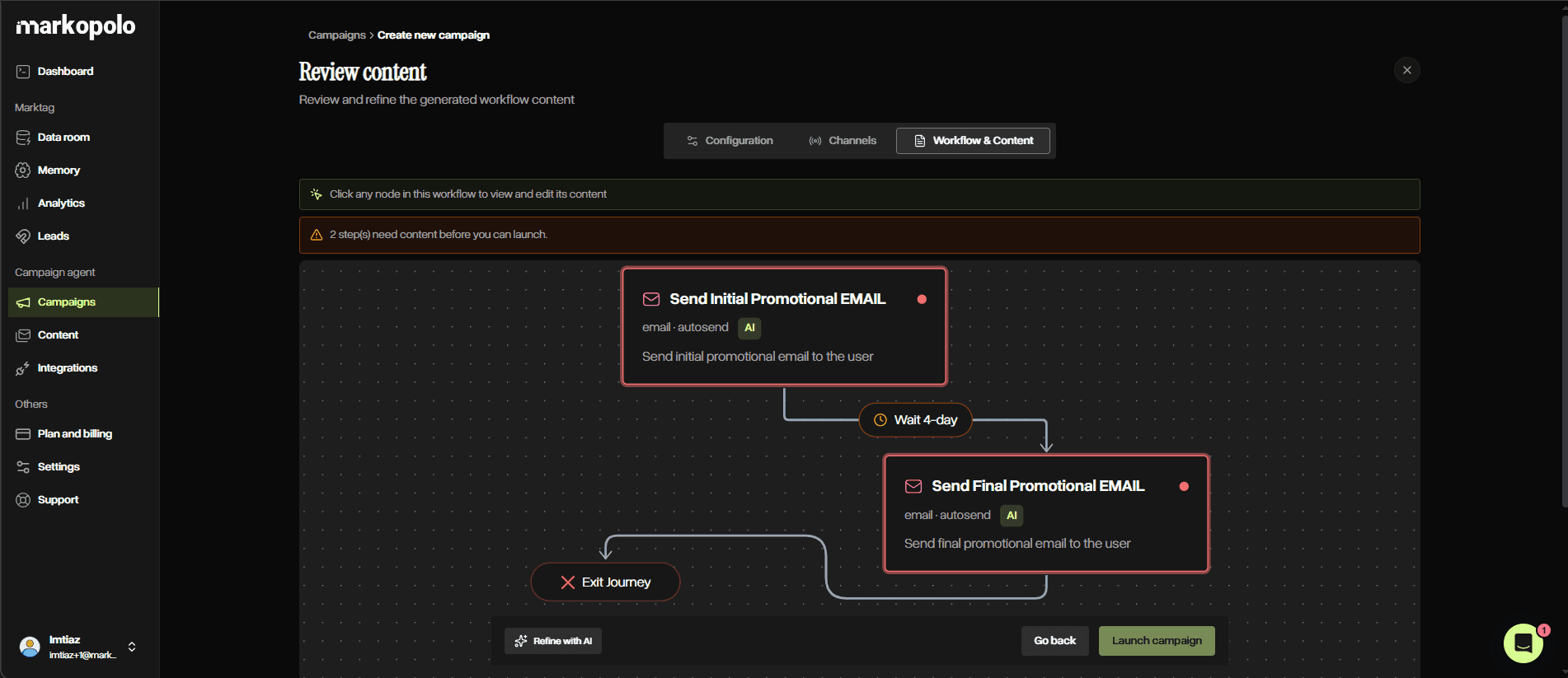
However, priorities should reflect your store’s traffic, order volume, product type, and normal purchase cycle. A consumable-products store may prioritize replenishment, while a high-traffic store with longer consideration periods may benefit more from browse abandonment.
Example of automated email marketing flows in eCommerce
Ecommerce email marketing automation flows are structured, behavior-triggered sequences designed to guide customers through the entire lifecycle—from acquisition and conversion to retention and reactivation.
Unlike one-off campaigns, these flows are activated by specific user actions or data signals, enabling highly personalized, timely, and scalable communication.
Implementing the correct automation framework improves conversion rates, increases customer lifetime value (CLV), and enhances overall marketing efficiency. As a marketer or ecommerce manager, you’ll find that the following core automation flows are optimized for performance, segmentation, and relevance.
Welcome automation campaign for new subscribers
Trigger: Email subscription or marketing consent
Objective: Convert new subscribers into first-time customers
The welcome email flow establishes brand positioning and initiates the customer relationship. As a brand strategist or CRM specialist, you should ensure it immediately delivers any promised incentive (e.g., discount code or lead magnet), followed by a structured introduction to the brand’s value proposition, product categories, and social proof.
Advanced segmentation should be applied based on acquisition source (e.g., product page, quiz, pop-up form) and behavioral targeting. Personalization elements may include product recommendations, category preferences, or geographic targeting—tools that any performance marketer can leverage to increase relevance.
Key Metrics: First-purchase conversion rate, engagement rate, revenue per subscriber
Browse, cart, and checkout abandonment recovery campaign automation
Trigger: Product view (browse abandonment) or cart activity without purchase
Objective: Recover lost conversions and reduce abandonment rates
Browse abandonment emails target users with moderate purchase intent, while cart abandonment flows address high-intent users who initiated checkout. If you're managing conversion funnels, you’ll want messaging to align with intent level—informational for browsers and conversion-focused for cart abandoners.
Dynamic content should include product images, variants, pricing, and availability. Objection handling (e.g., shipping costs, return policies) can be introduced progressively. Incentives should be reserved for later stages of the sequence to preserve margin, a key consideration for ecommerce operators.
Automation must include suppression logic to immediately stop messaging upon purchase completion.
Key Metrics: Cart recovery rate, conversion rate, revenue per recipient
Post-purchase campaign automation for retention
Trigger: Completed transaction
Objective: Enhance customer experience and drive repeat purchases
Post-purchase email flows focus on onboarding, product education, and relationship building. As a customer experience manager, you should ensure initial emails provide usage instructions, care guidelines, or setup assistance to reduce friction and returns.
Subsequent emails can introduce cross-sell or upsell opportunities based on purchase data, followed by review requests and user-generated content prompts. Transactional emails (order confirmations, shipping updates) must comply with regulatory requirements distinct from promotional messaging—something compliance teams should monitor closely.
Key Metrics: Repeat purchase rate, customer satisfaction, review submission rate
Replenishment and repeat purchase campaign automation
Trigger: Predicted product depletion or historical reorder interval
Objective: Increase purchase frequency and customer retention
Replenishment flows are particularly effective for consumable goods and subscription-adjacent products. If you're overseeing lifecycle marketing, timing should be based on estimated usage cycles (e.g., 30, 60, or 90 days) and refined using historical purchase behavior.
Personalization should include product details, previous order data, and recommended reorder timing. Predictive analytics can further optimize send timing and product suggestions, offering a clear advantage for data-driven marketers.
This is where an AI-powered email marketing tool for eCommerce stores becomes particularly useful. It can predict when each customer is likely to reorder and tailor the product recommendation or message accordingly.
Key Metrics: Reorder rate, purchase frequency, revenue per customer
Win-back campaign automation for inactive customers
Trigger: Defined period of inactivity based on purchase cycle
Objective: Reactivate dormant customers and recover lost revenue
Win-back email sequences should be segmented based on inactivity duration and prior customer value. As a retention specialist, you’ll want messaging that reintroduces the brand, highlights new products or updates, and leverages personalized recommendations based on historical purchases.
Incentives may be introduced in later stages of the sequence to encourage re-engagement. The inactivity threshold should align with the store’s average purchase frequency rather than arbitrary timeframes—an important consideration for any ecommerce analyst.
Key Metrics: Reactivation rate, recovered revenue, engagement rate
Back-in-stock and price-drop campaign automation
Trigger: Product restock or price reduction
Objective: Convert high-intent users and accelerate inventory turnover
Back-in-stock and price-drop emails are for users who have demonstrated explicit interest in specific products. If you're managing merchandising or promotions, these flows should prioritize immediacy, clarity, and urgency.
Dynamic personalization should include product variants (size, color), inventory status, and pricing changes. Urgency signals such as low stock indicators can improve conversion rates. Suppression logic must prevent redundant messaging after purchase or stock depletion.
Key Metrics: Conversion rate, revenue per recipient, alert-to-purchase rate
Customer milestone and VIP membership campaign automation
Trigger: Loyalty milestones, spending thresholds, or lifecycle events (e.g., birthdays, anniversaries)
Objective: Strengthen customer loyalty and increase lifetime value
VIP and milestone automation flows recognize and reward high-value customers. As a loyalty program manager or CRM lead, segmentation should be based on quantifiable metrics such as lifetime value, purchase frequency, and engagement level.
Rewards may include exclusive offers, early access to products, or personalized experiences. These flows reinforce brand affinity and incentivize continued engagement.
Key Metrics: Customer lifetime value (CLV), repeat purchase rate, VIP engagement rate
Failed-payment and subscription recovery campaign automation
Trigger: Failed transaction, expired payment method, or subscription renewal failure
Objective: Recover lost recurring revenue and maintain subscription continuity
Failed-payment automation flows are critical for subscription-based ecommerce models. If you're responsible for subscription operations, messaging should be clear, action-oriented, and frictionless, providing direct access to payment update mechanisms.
A structured sequence typically includes an initial notification, follow-up reminders, and a final warning prior to service interruption. Personalization should include subscription details, billing status, and renewal timelines.
Key Metrics: Payment recovery rate, retained subscriptions, recovered recurring revenue
Which KPIs should eCommerce brands track to measure email automation campaign performance?
Track the KPIs that match each flow’s goal. A welcome flow, for example, should be judged by first-purchase rate, while a cart-abandonment flow should be measured by recovered cart revenue and conversion rate.
First-purchase rate
Use first-purchase rate to measure how effectively welcome emails convert new subscribers into customers.
Recovered cart revenue
Track the revenue generated after customers receive cart-abandonment emails. This shows how much previously lost purchase intent the flow recovers.
Repeat-purchase rate
Apply this metric to post-purchase, replenishment, and retention flows to understand how effectively they encourage another order.
Conversion rate
Use conversion rate as a supporting metric to measure how often recipients complete the desired action, such as purchasing, renewing, or submitting a review.
Revenue per recipient
Revenue per recipient shows how efficiently each automation generates revenue across everyone who enters the flow.
Unsubscribe rate
A rising unsubscribe rate can indicate excessive frequency, poor targeting, or a mismatch between content and subscriber expectations.
Spam-complaint and deliverability rates
Monitor spam complaints, inbox placement, and delivery failures to protect sender reputation and automation reach.
Flow completion and exit rates
Review where customers continue, convert, exit, or drop off within the sequence. These patterns reveal weak messages, poorly timed delays, and unnecessary steps.How does eCommerce email marketing automation work?
How does email marketing automation work in eCommerce?
In eCommerce, email marketing automation works by utilizing predefined rules to send emails based on customer actions, behaviors, or profile data.
Instead of manually choosing recipients and scheduling every message, you build workflows that respond automatically as customers move through the buying journey.
Think of automation as a simple sequence of “if this, then that” steps.
The process usually works like this: a customer takes an action, such as viewing a product or abandoning a cart. Your ecommerce platform (such as Shopify or WooCommerce) records the event and passes the data to your email marketing platform. The automation then checks whether the customer meets specific conditions or belongs to a relevant segment. It sends one or more emails and adjusts, continues, or stops the workflow based on what the customer does next.
Uses triggers, conditions, and actions
A trigger in ecommerce email marketing automation is a specific customer action or condition that automatically starts an email workflow, such as a cart abandonment, product view, purchase, signup, or period of inactivity.
Conditions act as checkpoints to decide whether someone should keep moving through the flow, based on things like past purchases or location.
Actions are what actually happen next, such as sending an email, waiting a set amount of time, or updating a customer profile. Exit conditions make sure people drop out of the flow once they’ve done what you wanted, like completing a purchase.
For example:
Product added to cart → checkout not completed → wait two hours → send reminder → stop the flow if the customer purchases.
Runs through automated flows rather than one-off campaigns
Ecommerce flows are automatically activated by customer behavior, events, or predefined conditions. One-off campaigns are manually scheduled and sent to a broader audience, such as a promotional email announcing a seasonal sale.
And all of these can be possible through an email marketing automation platform for eCommerce.
Best practices for eCommerce email marketing automation
Strong segmentation and behavioral personalization make automation more useful because customers receive messages based on what they have done, purchased, or are likely to need next.
Use the following practices to keep your ecommerce email automations relevant, coordinated, and effective:
Matching timing to intent
Send high-intent reminders quickly, while aligning replenishment and reactivation emails with normal purchase cycles.
Suppressing customers after conversion
Remove buyers immediately from abandonment, win-back, or promotional flows once they complete the intended action.
Preventing conflicting automations
Set flow priorities and exclusions so customers do not receive overlapping or contradictory messages.
Personalizing beyond first names
Use viewed products, cart contents, purchase history, preferred categories, and customer value.
Controlling total frequency
Coordinate automated emails with scheduled campaigns to prevent fatigue and excessive messaging.
Reviewing performance regularly
Identify weak messages, delays, branches, and drop-off points using flow-specific KPIs.
Maintaining consent and suppression rules
Respect marketing permissions, unsubscribe requests, bounced addresses, and complaint-based exclusions.
Pairing email automation with SMS
For urgent moments such as cart recovery, delivery updates, and replenishment reminders, SMS marketing automation strategies for eCommerce can complement email by reaching customers faster, while shared frequency and suppression rules prevent duplicate or conflicting messages.
FAQs
How can I automate email marketing for my eCommerce brand?
First, you need to connect your eCommerce store to an email marketing automation platform like Markopolo AI, then set each workflow’s trigger, audience, timing, exit rule, and success metric.
What emails should an eCommerce store automate first?
Welcome, cart abandonment, and post-purchase email flows generally provide the strongest foundation because they address subscriber acquisition, incomplete purchases, and customer retention.
How many promotional emails should an eCommerce automation contain?
Between 2-3. Use the shortest sequence capable of resolving the customer’s current need. Most flows can begin with two or three messages and expand only when performance data supports it.
Can small eCommerce stores use email automation?
Yes. Small stores can begin with a few high-intent triggers and simple sequences rather than building complex conditional workflows. As a matter of fact, there are many free email automation tools for ecommerce brands which you can use.