SMS Marketing Automation Strategies for eCommerce: Guide to Building Flows Around Shopper Intent
Sirazum Monir Osmani
SMS marketing automation strategies for ecommerce are frameworks that use shopper behavior, purchase history, and engagement signals to automatically send the right text message at the right stage of the customer journey.
Ecommerce brands use these strategies to acquire customers, recover abandoned carts and checkouts, drive repeat purchases, and prevent churn.
SMS marketing automation works through behavioral triggers such as product views, cart additions, purchases, inactivity, and loyalty actions. When these triggers are paired with the right message and offer, brands can increase conversions, average order value, repeat purchases, and customer lifetime value.
This guide explains how to build SMS automation flows around shopper intent so that each message matches what a customer is most likely to do next.
10 eCommerce SMS marketing automation strategies based on shopper behavior and intent
The most effective eCommerce SMS marketing automation strategies trigger messages based on real-time shopper behavior (what they do) and intent signals (how likely they’re to buy).
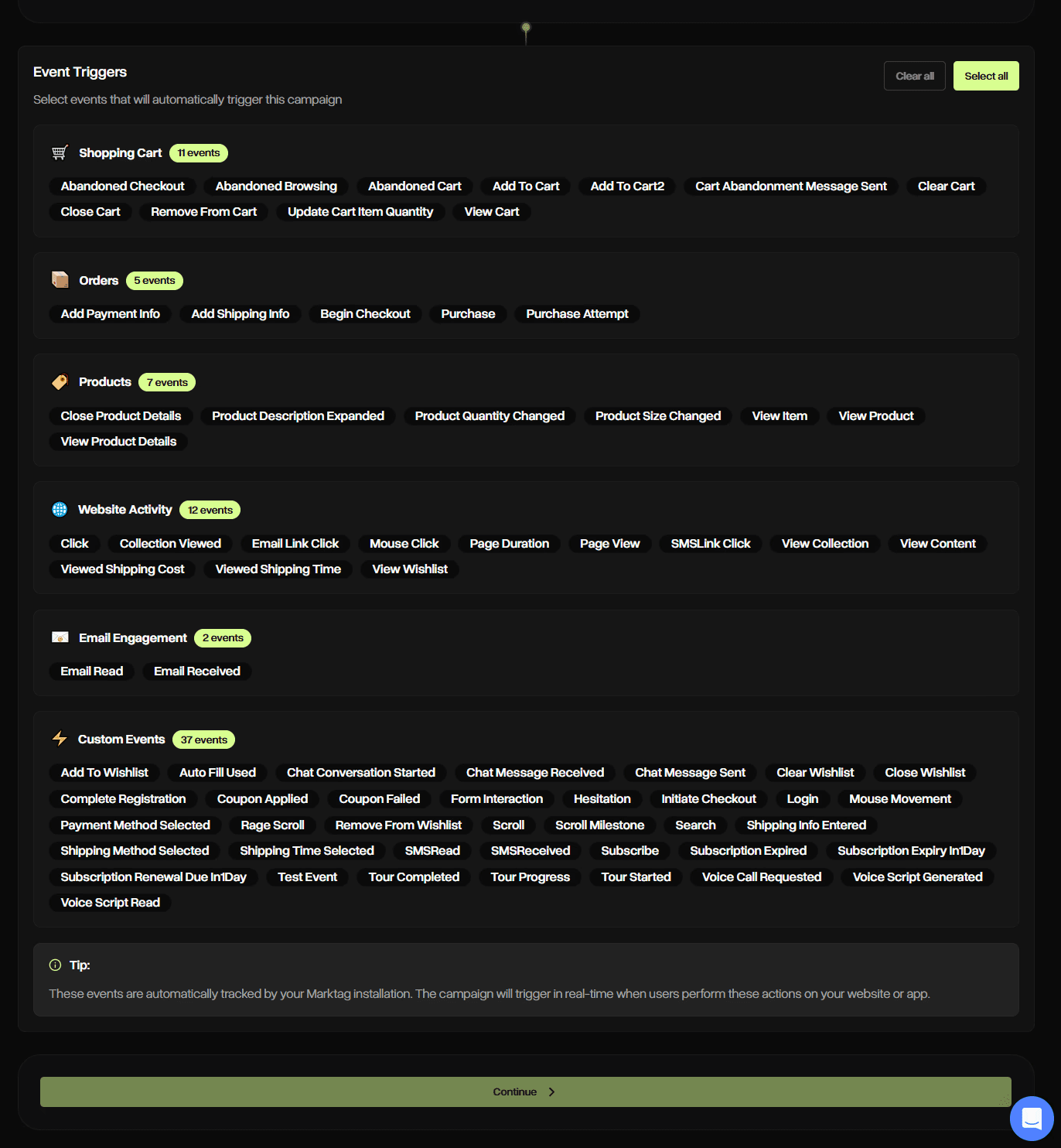
And identifying highly specific intent and behavior, such as whether a shopper left immediately after viewing shipping details, requires platform-specific events and custom tracking.
Markopolo AI comes with these built-in features in its AI-powered SMS marketing solution for eCommerce. You can send messages tailored to hesitation, mouse movement, site search, shipping concerns, payment failures, coupon usage, etc.—all autonomously.
Automate SMS marketing for your eCommerce store today
Markopolo AI allows you to implement SMS marketing automation for your eCommerce brand
No credit card required

Here are 10 strategies to automate your ecommerce SMS marketing based on shopper intent:
1. Recover checkout abandoners by solving the reason they dropped off
Set this SMS automation to trigger when a shopper starts checkout but does not complete a purchase within 45 minutes.
Start by creating separate branches based on checkout behavior or available checkout data. Here are some examples:
If the shopper left after seeing shipping, send an SMS that addresses delivery cost, shipping concerns, or estimated arrival times.
If payment failed, send a clean checkout recovery link and instructions to retry.
If they viewed delivery details, reassure them about timing, returns, or tracking.
If they applied for a coupon and left, they may be waiting for a better offer, so reserve any incentive for a later message if they still have not converted.
For COD markets, add a confirmation SMS before fulfillment. End the automation as soon as the order is completed, and measure performance using checkout completion rate and recovered revenue.
2. Use cart abandonment SMS with a discount-last sequence
Because cart abandonment encompasses different behavior signals, treating all events as equivalent is not ideal.
It’s best to let an abandoned cart sit for around an hour before sending the first SMS, and only trigger it if the shopper has not moved into checkout or completed the order. There are different behavioral signals in cart abandonment, hence treating all events as the same is not ideal.
You can replicate the following flow:
The first SMS should be a simple reminder with the product name, saved cart link, and no discount.
If they still do not return within 24 hours, send a second SMS a few hours later with a trust cue, product benefit, review, sizing help, or support option.
Use the final SMS only if they still have not purchased after 48 hours, and only if margin allows an incentive. Exit the flow once they buy.
3. Trigger browse abandonment SMS only when intent is strong enough
Browse abandonment SMS should trigger only after a shopper shows meaningful interest, not after one random product view.
Think about a shopper who only browsed one product and left the site. They are still early in the journey and showed little interest. So it’s best not to nudge them.
But if someone views multiple products in the same category before exiting the site, or spends time on reviews, or checks the FAQ section, their intent is much stronger.
Even though both customers fall under the browse abandonment segment, their intent is different.
Out of the two, it's best to target only the high-intent one for an SMS, because the other would see it as intrusive or spammy. That SMS should encourage them to browse more rather than pushing them to buy.
For example:
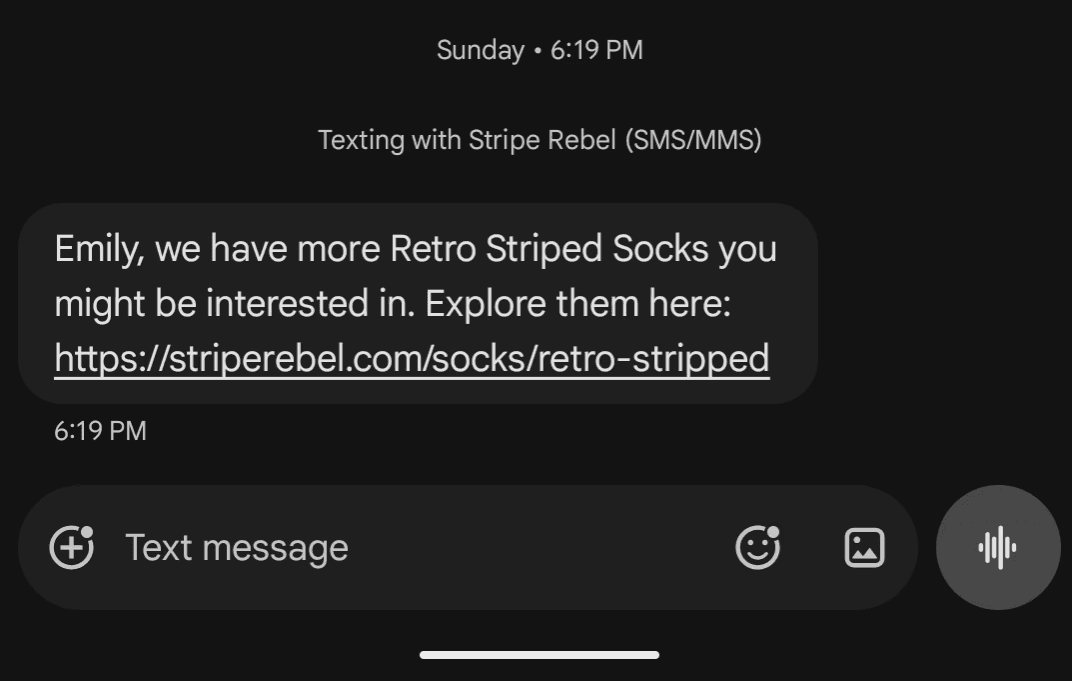
Use conditions such as viewing the same product twice, browsing a high-value product, returning after an earlier visit, viewing a category they previously bought from, or clicking from an email or ad before viewing the product.
Delay the SMS by 1–3 hours so it feels like a helpful follow-up, not surveillance.
Keep the message soft: recommend similar products, answer a common question, or send them back to the category.
Measure clicks, assisted revenue, and opt-outs.
4. Deploy site-search abandonment SMS when shoppers search but never click
A shopper who searches “waterproof,” “travel-size,” or “keto” twice in one session is not casually browsing. They are trying to find something specific. The problem starts when those searches lead to no product views, because it usually means the store failed to surface the right item.
That is where SMS can act like assisted shopping. After about an hour, send a helpful text with a curated collection, best-matching products, or an option to reply for a recommendation. This flow works best when the message solves the search, not when it pushes a random product.
5. Send back-in-stock and price-drop SMS only when there is product-level intent
Back-in-stock and price-drop SMS automations should fire only when a shopper has shown interest in a specific SKU, such as joining a waitlist, viewing the same product repeatedly, selecting an unavailable size, or clicking a product from an email or ad.
These SMS should:
Be factual and direct: the item is back, the price changed, or the size/color they wanted is available again.
Link straight to that product page, not a collection page.
Avoid fake urgency unless inventory is actually low.
Measure this flow by product-page clicks, conversion rate, and revenue per message.
6. Build post-purchase SMS as a trust flow before it becomes a sales flow
The best post-purchase SMS fires immediately after an order is placed, but treats the first few messages as reassurance, not promotion.
So, start with order confirmation, then send shipping updates, delivery expectations, and tracking links as the order moves.
After delivery, send a useful care tip, setup guide, or usage suggestion based on the product bought. Only then ask for a review or send a second-purchase nudge.
Suppress upsell messages until the order is delivered and the buyer has had time to use the product. Measure delivery engagement, reviews, repeat purchase rate, and support tickets reduced.
7. Fast-track high-intent second buyers toward their third purchase
Turn high-intent second buyers into third-time customers by tying their next purchase to a clear loyalty milestone.
If a customer starts checking points, logging into their account, or visiting the rewards page after their second order, send an SMS that highlights their progress:
“You’re one order away from unlocking early access”
or
“Your next purchase moves you into VIP rewards.”
Focus on the benefit they are about to unlock, and link directly to the reward, eligible products, or loyalty page.
8. Use replenishment SMS based on product consumption cycles, not random delays
Trigger replenishment SMS messages when the customer is likely close to running out, not a fixed number of days after purchase.
Estimate the reorder window from the product type, quantity, and normal usage pattern: skincare by bottle size and application frequency, supplements by serving count, pet food by package size, coffee by order quantity, and household goods by repeat purchase interval.
Send the reminder a few days before depletion with a direct reorder link.
For repeat buyers, adjust timing based on their actual purchase history. Measure repeat purchase rate, reorder revenue, and subscription conversions.
9. Run win-back SMS based on missed purchase windows, not just inactivity
Flow win-back SMS when a customer breaks their normal buying pattern, not only when they hit a fixed 60- or 90-day inactivity rule. For example:
A repeat buyer who usually orders every 45 days should enter the flow when that window is missed.
VIP customers who suddenly stop buying should get a relationship-led message, not a generic discount.
First-time buyers need a second-purchase nudge.
Discount-only buyers may need a different offer or no offer at all.
Determine the success of this SMS automation campaign by reactivated customers, repeat revenue, and unsubscribe rate.
10. Use VIP SMS for access, not just bigger discounts
VIP SMS works better when it gives them something that feels earned: early access to a drop, a private restock alert, a loyalty reward, a referral invitation, or a short founder note before a public launch.
So, your best customers should not feel like they are being put into a louder promo list.
Discounts can still exist, but they should not be the default reason to text this group. The automation can be built around high AOV, repeat orders, loyalty tier, or full-price purchase behavior. Keep the volume low so the access still feels valuable.
When should an eCommerce store send an automated SMS? (the right way to do SMS automations that actually grow ecommerce sales)
An eCommerce store should send an automated SMS when shopper behavior indicates a likely next action. For example, a shopper who abandons checkout may need a reminder to complete a purchase, while a repeat customer may be ready for a replenishment or loyalty offer.
These intent signals appear through events such as product views, cart additions, checkout abandonment, purchases, searches, and repeat visits. Most eCommerce SMS marketing automation platforms can track these events automatically.
The best SMS marketing automation tools for ecommerce come with these as buil-in features.
Their goal is to match each SMS to the shopper's intent. When timing, message, and intent align, SMS becomes a conversion channel rather than an interruption.
Here’s how to build SMS automations around shopper intent:
Understand each shopper’s intent
Shopper intent in ecommerce refers to a visitor’s underlying motivation and likelihood to make a purchase when browsing an online store. It measures why they’re there and how ready they are to buy. The following table describes this in detail:
Segment | Shopper mode | Triggered by | SMS approach |
|---|---|---|---|
Checkout abandoner | Ready to buy | Reached payment page, didn't complete | Urgency + friction removal (saved cart link, fast checkout) |
Cart abandoner | Considering | Added to cart, left without checking out | Reassurance + social proof or a small incentive |
Browse abandoner | Exploring | Viewed products, no cart activity | Soft nudge with related products; no hard sell |
Recent buyer | Post-purchase | Completed an order in the last 7–14 days | Order confirmation, tips, cross-sell only after trust is built |
Lapsed buyer | Disengaged | No purchase in 60–90+ days | Value-first message; remind them what they loved |
VIP customer | Invested | High AOV, repeat purchases, loyalty tier | Early access, exclusive drops, personal tone — not promotions |
Use SMS when speed matters and email when context matters
Email and SMS, both channels belong to ecommerce marketing automation apps, but they shouldn't do the same job.
You should use SMS to trigger action, and email to build understanding.
SMS is built for moments where timing is everything. A cart sitting idle, a product back in stock, a price that just dropped, or a delivery update — these messages lose value within hours. SMS catches the shopper before the moment passes.
Email earns its place when the message needs room to breathe. Product education, brand storytelling, visual lookbooks, multi-product recommendations, or explaining a loyalty program — these need layout, imagery, and length that SMS cannot support.
Connect automations to ecommerce events, not campaign calendars
Every meaningful moment in a shopper's journey leaves a signal, such as a product viewed, an item added to cart, a checkout started but not finished, an order placed, fulfilled, or delivered.
Beyond the purchase cycle, inactivity is an event too. So is hitting a repeat purchase window, or a product coming back in stock.
Each of these should trigger an SMS automatically, without a marketer deciding it's "time to send something."
When automations fire from behavior, messages arrive when the shopper is already thinking about your brand, not when your calendar says so.
Add suppression rules before scaling flows
Suppression rules prevent sending the wrong SMS at the wrong time, which becomes more likely as you add more automations.
Before scaling any flow, build these guardrails in:
Do not send a cart recovery SMS after the shopper has already purchased. It signals that your system isn't paying attention.
Do not send a promotional message to someone who just filed a support complaint. Timing like that kills trust.
Do not trigger a win-back sequence for a shopper who clicked a link yesterday as they're already re-engaged.
Do not let multiple automation flows fire on the same day. One shopper should not receive three texts because three triggers fired simultaneously.
And keep recent buyers out of aggressive discount flows. They paid full price and shouldn't be trained to wait for a deal.
Build offer ladders instead of defaulting to discounts
Offer ladders in ecommerce SMS (often called discount ladders or offer laddering) are a retention strategy where you send a sequence of progressively stronger offers via SMS to encourage a customer to make a purchase, but only if they haven’t converted yet.
Step | Trigger (if no purchase) | SMS Offer Example |
|---|---|---|
1 | 1–3 days after first order | “Your sneakers are waiting!” |
2 | Still no purchase after Step 1 | |
3 | Still no purchase after Step 2 |
Jumping straight to a discount is the most expensive habit in SMS marketing. It trains shoppers to abandon carts on purpose and waits for the coupon.
An offer ladder fixes this. Save your margin by earning the conversion first.
Measure each SMS flow by the job it was built to do
Cart abandonment flows should be measured by recovered revenue.
Checkout abandonment by completion rate.
A welcome flow earns its keep through first purchase rate, not open rate.
Post-purchase flows should move review submissions and second purchases.
Replenishment flows live or die on repeat purchase rate.
Win-back campaigns answer one question: how many lapsed shoppers bought again.
VIP flows are measured by revenue per subscriber and long-term retention, because that audience is not being converted, they are being kept.
When the metric matches the mission, you know exactly which SMS flows are working and which ones need to be rebuilt.
How often should ecommerce brands send SMS?
It depends on who you're texting, not what day it is. Sending a fixed schedule to your whole list is what kills SMS programs. The brands that get it right send based on customer intent — and they watch opt-out rate to know when they've crossed the line.
Use customer intent to decide frequency
Frequency isn't a brand decision — it's a customer signal. High-intent customers (active cart, recent click) tolerate more contact. Low-intent ones (signed up for a discount, never bought) drop off fast if you over-message.
Watch opt-out rate as a fatigue signal
An opt-out isn't just a compliance number. It's a customer telling you the texts weren't worth it. If your opt-out rate climbs above 2% per campaign, you're either sending too often or saying too little.
Build a simple SMS sending rule
Customer | Send cadence |
|---|---|
High intent (cart and checkout abandoner) | 45 minutes to 1 hour |
Warm customer (bought once, recently engaged) | Selectively, 2x-3x/month |
Cold subscriber (no purchase, low engagement) | Rarely — save it for your best offer |
Recent buyer | Service messages first, promotions later |
How to measure SMS automation performance
The first rule of thumb is to stop optimizing for open rate. SMS open rates are almost always high, that's the nature of the channel. What tells you whether your campaign is actually working is revenue per recipient, opt-out rate, and whether each flow is doing its specific job.
Track revenue per recipient, not just open rate
The metrics worth watching are clicks, conversions, revenue per message sent, and opt-out rate, alongside subscriber growth and click-through rate, as the core ecommerce SMS metrics. Open rate is a vanity number on SMS. Revenue per recipient is not.
Measure each flow by its job
Flow | Metric that matters |
|---|---|
Cart abandonment | Recovered revenue |
Welcome | First purchase rate |
Post-purchase | Review rate, second purchase rate |
Replenishment | Repeat purchase rate |
Win-back | Reactivation rate |
VIP | Revenue per subscriber |
If your cart abandonment flow has strong open rates but low recovered revenue, the flow is failing, regardless of what the dashboard looks like.
Use SMS attribution carefully
SMS often starts the path to purchase without finishing it. A customer clicks your text, browses, then buys later through a Google search or email. That conversion shows up as paid or email in your reports, but SMS assists it.
Use UTM links on every SMS, unique discount codes per flow, and flow-level reporting inside your SMS platform. Without those three, you're undercounting what SMS actually does.
Common SMS automation mistakes eCommerce brands should avoid
Most brands either overload SMS with email-style content, blast every subscriber with every promo, or skip post-purchase entirely. Any one of these erodes the channel. All of them together kill it.
Treating SMS like a cheaper version of email
SMS is not a shorter email. One message, one link, one action. Long copy, product education, and multiple CTAs belong in email. If your SMS needs a "read more" to make sense, rewrite it.
Sending every promo to every subscriber
Blasting your full list with every sale trains subscribers to ignore you — or opt out. Segment by purchase history, intent, and engagement. A first-time visitor and a repeat buyer should rarely get the same message.
Discounting too early in abandonment flows
Lead with intent, not incentive. A customer who abandoned checkout an hour ago might buy with a simple reminder. Throwing a discount at them immediately costs you margin you didn't need to spend. Save the offer for the second or third touch, if they still haven't converted.
Ignoring post-purchase messages
If every SMS a customer gets is promotional, they start treating the channel as noise. Order confirmations, shipping updates, and replenishment reminders do two things: they build trust, and they make your next promo land better because the customer already associates your texts with something useful.
Building too many flows before fixing the core ones
Five flows done well beat fifteen flows done poorly. Get cart abandonment, checkout abandonment, welcome, post-purchase, and win-back working before adding anything else. Advanced flows built on a weak foundation just automate mediocre results at scale.
The bottom line: SMS marketing automation works when every message has a job
The best SMS automations are triggered by specific customer actions and behaviors rather than sent on a fixed schedule or in higher volumes.
As part of a broader eCommerce marketing automation strategy, SMS helps connect acquisition, conversion, retention, and win-back efforts across the customer lifecycle.
A shopper who abandons a cart, completes a purchase, or returns after a long gap is giving you a signal, and each signal calls for a different type of message. Start by fixing the highest-intent revenue leaks, such as cart and checkout abandonment, then build post-purchase, retention, replenishment, and VIP flows as your program matures.
Just as importantly, use suppression rules to avoid messaging shoppers who are unlikely to benefit from another text. Every automation should have a clear job, whether that is recovering a sale, building trust, driving a reorder, or increasing loyalty. When each SMS is tied to shopper intent and measured against its specific goal, SMS becomes a revenue channel instead of just another marketing channel.