Comparing 10 Best Email Marketing Automation Platforms for eCommerce with Pros and Cons (2026 Guide)
Sirazum Monir Osmani
Platform | Best for | Key automation capability | eCommerce and data integrations | AI and personalization | Free plan | Main limitation |
|---|---|---|---|---|---|---|
Markopolo AI | Behavior-driven, hyper-personalized eCommerce lifecycle marketing | Nearly 100 behavioral triggers, multiple flow-entry triggers, and AI-generated autonomous workflows | Shopify, WooCommerce, other eCommerce ecosystems, HubSpot, Salesforce, Pipedrive, Zoho, and other CRMs | Agentic workflow generation, near-real-time segmentation, behavioral intelligence, and personalized product recommendations | Yes; includes 5,000 monthly emails | Stores outside Shopify and WooCommerce require assisted onboarding |
Klaviyo | Shopify brands needing predictive analytics and detailed revenue reporting | Visual workflows with behavioral triggers and eCommerce flow templates | Strong Shopify integration; support for other commerce platforms varies | Predictive purchase analysis, customer lifetime value segments, AI content assistance, and product recommendations | Yes | Each flow supports only one behavioral trigger, and free email support ends after 60 days |
Omnisend | Small and growing stores seeking accessible email automation | Prebuilt welcome, browse-abandonment, cart-abandonment, and post-purchase workflows | Built-in eCommerce product, discount, and catalog functionality | Product recommendations and basic AI-assisted features | Yes | Detailed reporting is not real-time, and free-plan emails include Omnisend branding |
SmartrMail | Store owners who want straightforward eCommerce-specific automation | Preconfigured automations for welcome, abandonment, recommendations, and newsletters | Shopify, Shopify Plus, WooCommerce, BigCommerce, and Maropost Commerce Cloud | Automated recommendations based on browsing and purchase history | Yes; limited to 200 subscribers and 1,000 monthly emails | Limited integration ecosystem and less control over advanced workflow logic |
Drip | eCommerce teams needing flexible behavioral workflows | Flexible triggers and actions organized by connected store platform | Designed around eCommerce platform integrations | Behavioral personalization and onsite campaign targeting | No | Interface can be difficult to navigate, and SMS is available only as a US add-on |
ActiveCampaign | Teams needing advanced branching and detailed reporting | Extensive triggers, actions, conditional branches, and prebuilt automation recipes | Supports eCommerce and broader marketing integrations | AI-generated workflows, campaign assistance, and behavioral targeting | No | Steep learning curve and potentially high scaling costs |
Customer.io | Technical teams with complex customer-data infrastructure | Event-based workflows with branching, delays, conditional waits, webhooks, and multivariate testing | APIs, SDKs, JavaScript tracking, reverse ETL, webhooks, databases, and data warehouses | LLM actions using live customer data for content, classification, scoring, and journey decisions | No | Requires technical implementation and is less plug-and-play for eCommerce stores |
Mailchimp | Small businesses combining newsletters with basic eCommerce campaigns | Triggers for purchases, abandoned browsing, back-in-stock events, and predicted purchase dates | Shopify, WooCommerce, Wix, and other major platforms | Predictive segmentation, AI assistance, and customer lifetime value estimates | Yes, but with limited eCommerce functionality | Automations require a paid plan, and inactive or unsubscribed contacts can still affect billing |
Brevo | Cost-conscious businesses combining email with lead generation | Automated campaigns with conditional content and customer segmentation | Product-catalog synchronization and eCommerce activity tracking | Conditional email content based on customer attributes or behavior | Yes | Narrower segmentation and limited product-variant data in emails |
GetResponse | Businesses combining email marketing with webinars and lead generation | Automated journeys supported by templates, forms, and segmentation | eCommerce integrations are available primarily through paid plans | AI-generated campaign drafts and audience segmentation | Yes, but without eCommerce store integration | Advanced eCommerce features require a higher-priced plan, and conditional email content is unavailable |
Automate email marketing for your eCommerce store with Markopolo AI
Our platform automates email marketing for eCommerce brands using behavioral triggers
No credit card needed

Markopolo AI
Pros
Markopolo AI has the most comprehensive set of automation flow entry points and behavioral triggers in this list. Apart from sign ups, cart abandonment, and other traditional eCommerce events, the platform comes with nearly 100 built-in triggers, such as “Viewed Shipping Cost”, “Coupon Failed”, “Scroll Milestone”, etc. This allows eCommerce marketers and store owners to make their lifecycle campaigns 1:1 hyper-personalized through behavioral intelligence.
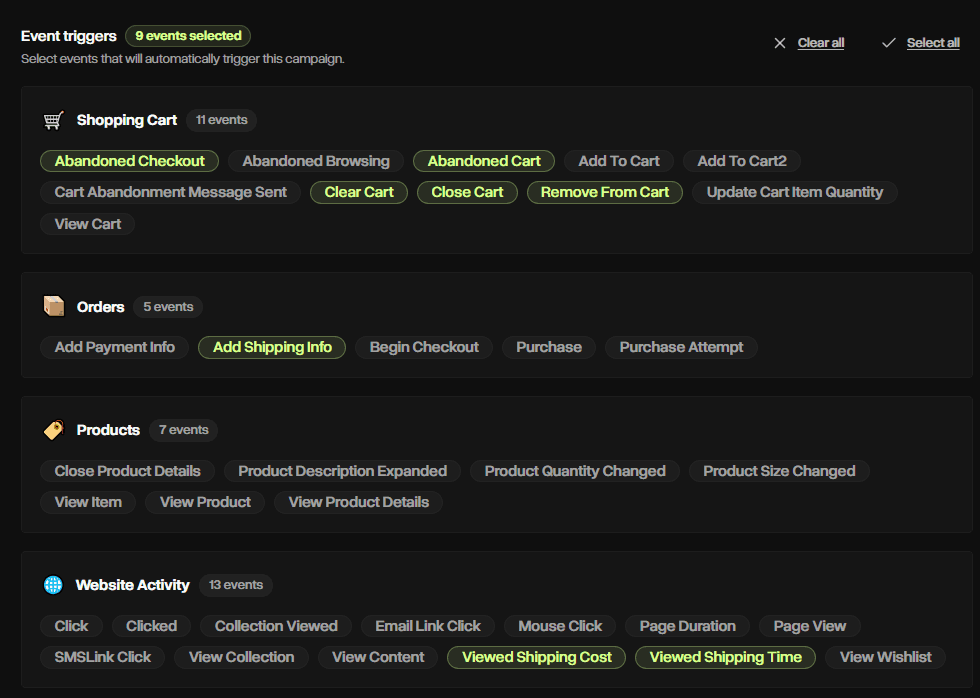
The platform supports multiple entries and triggers for one flow, which a lot of the tools in this list, such as Klaviyo and Omnisend, don't support.
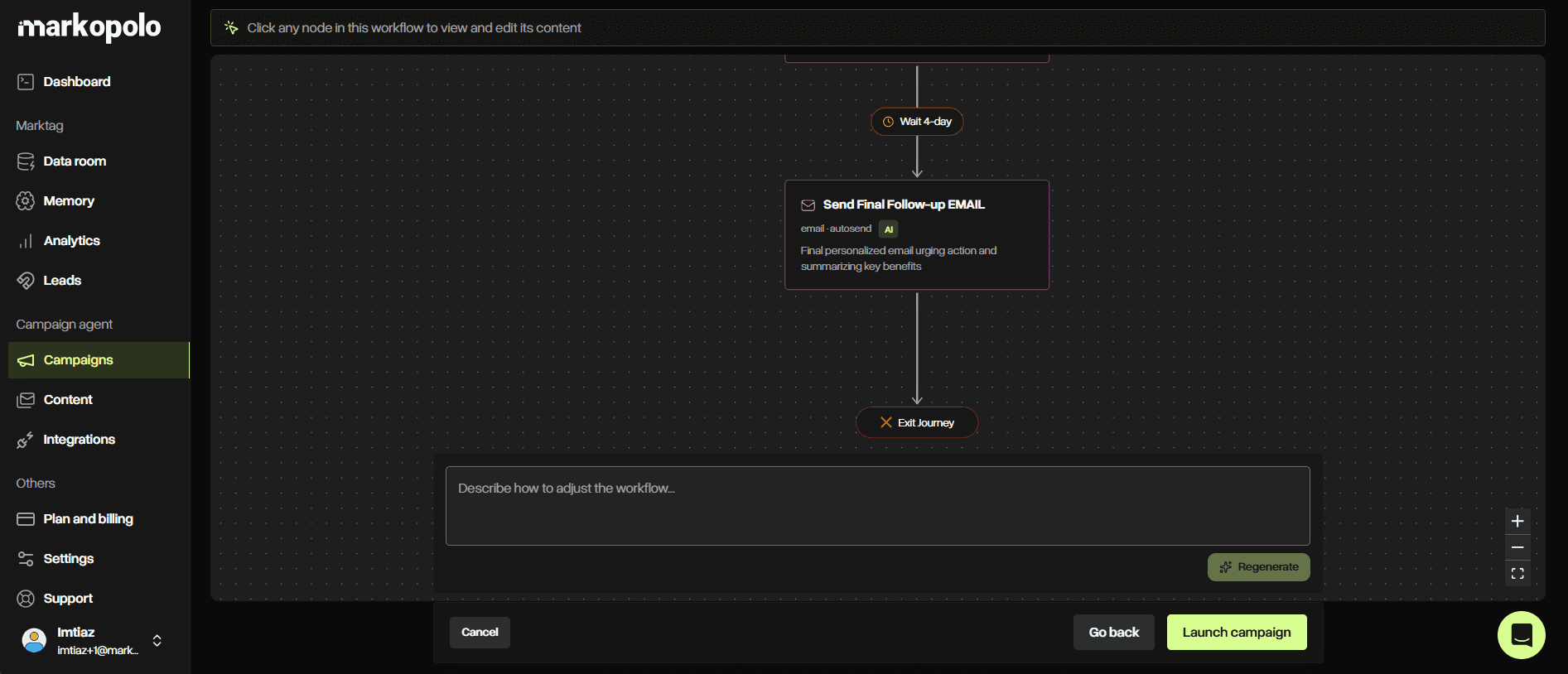
Markopolo AI comes with an agentic workflow builder to create campaign flows automatically. You simply choose the relevant events, triggers, and channels, such as email, and the platform generates the workflow autonomously. The platform also gives you the freedom to tweak the flow when necessary by selecting the option “Regenerate Flow” and asking the AI to adjust the sequence.
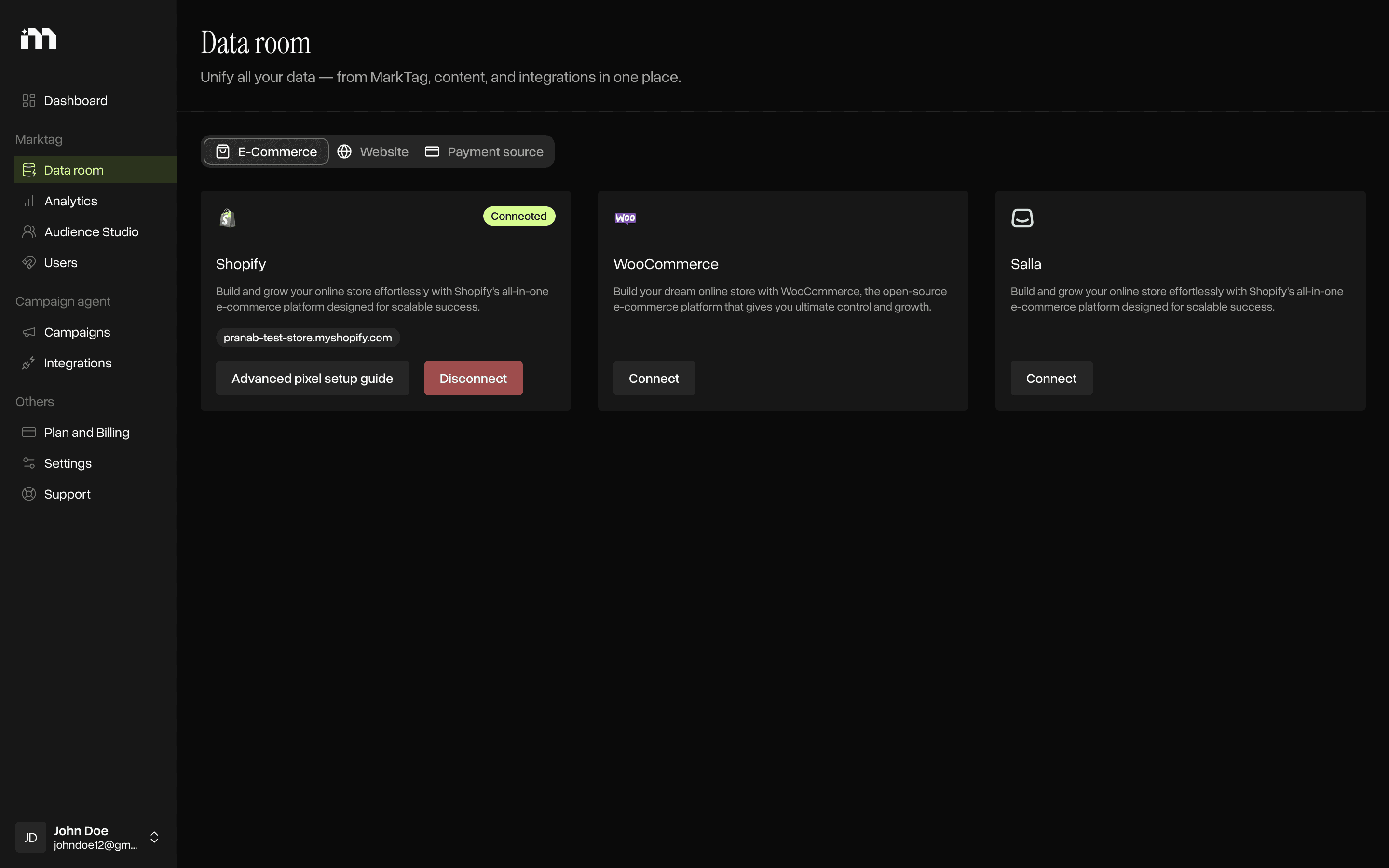
The platform integrates seamlessly with all eCommerce platforms such as Shopify, WooCommerce, and any ecosystems. Markopolo AI also integrates with CRMs like HubSpot, Pipedrive, Salesforce, Zoho, etc., helping eCommerce brands unify customer data from multiple sources.
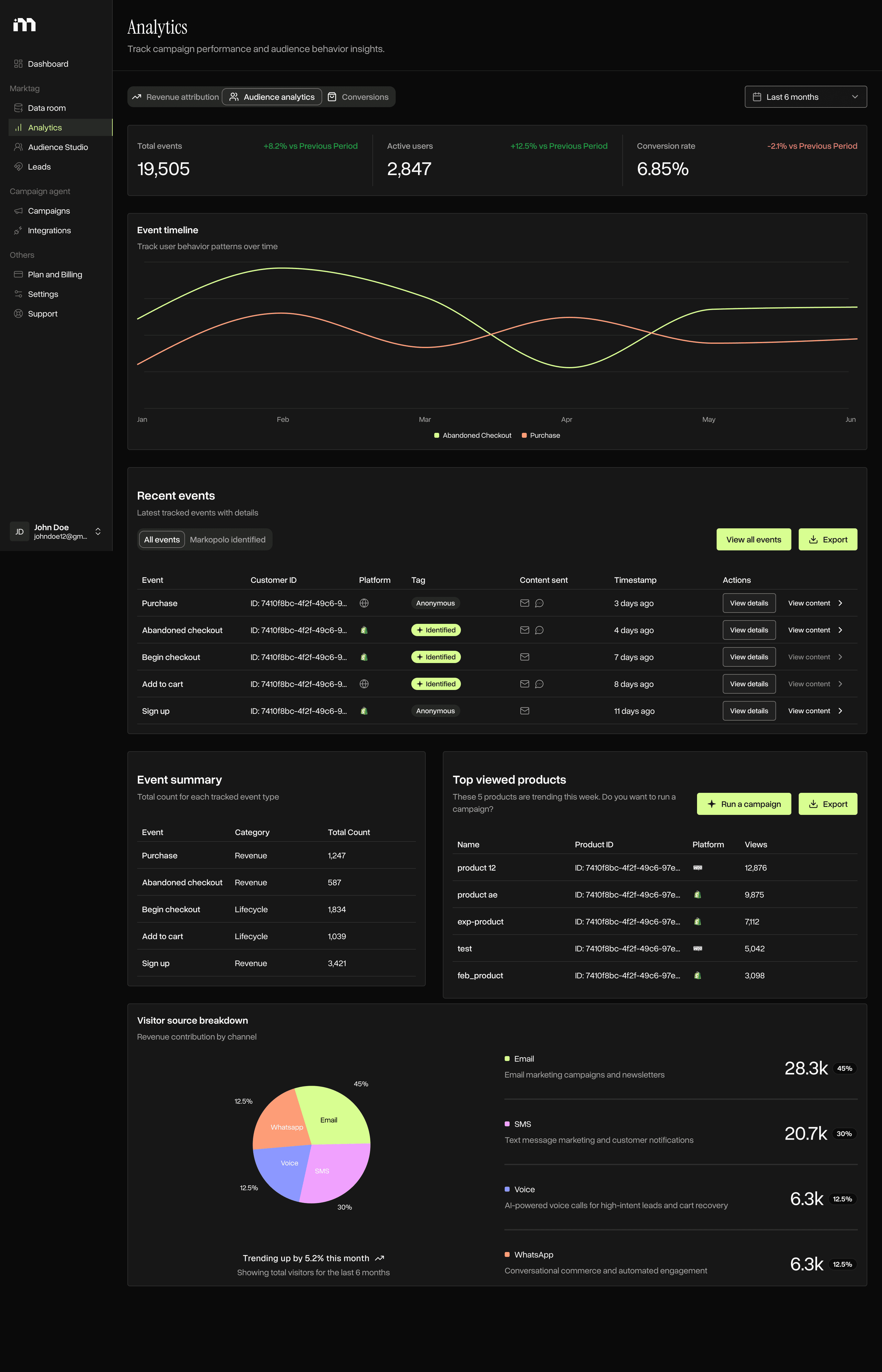
Markopolo AI also has a built-in compostable CDP called MarkTag. This makes your email marketing campaigns segment in near real time, eliminates inconsistent targeting across channels (if you go omnichannel with SMS, push, WhatsApp), and enables better personalization, such as product recommendations, lifecycle-stage messaging, and abandonment recovery based on live customer behavior.
Markopolo AI automatically segments audiences and supports any type of custom campaigns such as welcome flows, browse abandonment, cart and checkout recovery, personalized product recommendations, back-in-stock, retention and loyalty campaigns, product launches, replenishment reminders, and repeat-purchase flows.
Markopolo AI uses first-party, server-side, cookieless tracking to maintain accuracy.
The platform’s analytical features show email campaign open rates, CTR, deliverability rates, etc.
Its revenue attribution, analytics, testing, and deliverability tools help eCommerce teams measure campaign impact, optimize performance, and improve results over time.
The free plan comes with 5,000 monthly emails, which gives small online stores an email marketing automation platform at 0$ cost.
The platform is suitable for eCommerce businesses of all sizes, from SMBs to mid-market and enterprise brands.
Cons
eCommerce stores built on platforms other than Shopify or WooCommerce require white-glove onboarding by booking a free demo with the Markopolo AI team rather than a fully self-serve setup.
eCommerce brands looking only for traditional batch-and-blast email campaigns will find Markopolo AI more advanced than necessary, as the platform is built for behavior-driven, individually personalized customer journeys.
Klaviyo
Pros
Klaviyo’s A/B testing isn't limited to subject lines and email copy. You can test signup forms too, something most other platforms in this comparison don't offer.
The drag-and-drop editor makes building campaigns simple, and you can drop dynamic product recommendations directly into emails, a feature ActiveCampaign and a few other tools skip.
The AI tools go beyond basic content generation. Predictive analytics can flag when a customer is likely due for a repeat purchase and build predictive segments around estimated customer lifetime value. A built-in AI agent studies your brand to help draft campaigns, automations, and smarter customer segments.
Reporting ties revenue attribution and revenue-per-recipient figures to individual flows and campaigns. Klaviyo also publishes its own industry benchmark data, so you can see how your numbers compare to similar stores, a comparison tool none of the other platforms here provide.
Cons
Each Klaviyo flow can begin with only one behavioral trigger. eCommerce stores that want the same customer journey to start from several independent events generally need to create and maintain separate automations.
Free-plan accounts lose access to email support 60 days after signup.
A large share of the pre-built flow templates are designed around Shopify specifically, so if you're on another store platform, you may find more value with a different tool.
Omnisend
Pros
Discount codes, dynamic product listings, and a product recommendation block are built into emails from the start, so you're not bolting on separate eCommerce integrations the way you might with some other platforms.
Omnisend is easy to use, and it’s generally one of the more affordable email marketing automation tools for online stores.
Pre-built workflows cover the core behavioral automation triggers eCommerce brands need most, including welcome series, abandoned cart, browse abandonment, and post-purchase follow-up.
Cons
Advanced reporting, including revenue attribution, doesn't update in real time. The detailed campaign report, for instance, refreshes only once a day, so the numbers you're looking at can already be a day old.
The free plan has been scaled back over time, especially around advanced AI features, and your emails will carry the Omnisend logo on the free tier until you upgrade.
SmartrMail
Pros
SmartrMail is designed specifically for eCommerce email marketing rather than general-purpose marketing automation. It connects directly with Shopify, Shopify Plus, BigCommerce, WooCommerce, and Maropost Commerce Cloud, syncing products, customers, purchase histories, and store activity.
Its product lookup feature allows marketers to insert product images, descriptions, prices, and store links into an email without manually copying the information. This makes newsletters and promotional emails faster to build and keeps product information connected to the store catalog.
SmartrMail uses purchase history and browsing behavior to produce automated product recommendation emails for individual customers. Store data is synchronized automatically, including previous purchases, so brands can begin using personalized recommendations without manually rebuilding customer histories.
The platform covers important eCommerce use cases such as welcome emails, abandoned-cart recovery, browse-abandonment campaigns, newsletters, popups, and recurring recommendation emails. Its accessible editor and preconfigured automation approach make it suitable for store owners who do not want to build complex workflows from scratch.
All plans allow unlimited automations, and SmartrMail counts each email address only once even when the subscriber appears in multiple lists. Paid customers can also request free migration assistance when moving from another email provider.
Cons
SmartrMail’s direct integration ecosystem is relatively narrow. The platform primarily supports Shopify, BigCommerce, WooCommerce, and Maropost Commerce Cloud, so stores running on other eCommerce platforms do not receive the same one-click setup experience.
The free plan is limited to 200 subscribers and a maximum of 1,000 emails per month. Growing stores will therefore need to upgrade relatively early as their subscriber database and campaign frequency increase.
Some of the platform’s more advanced capabilities, including send-time A/B testing and Smart Send Frequency, are reserved for the Pro plan. Dedicated onboarding, account management, agency support, and deliverability management are also limited to that tier.
SmartrMail is easier to operate than broader customer-engagement platforms, but it provides less control over sophisticated data models, deeply branched journeys, and custom event-driven automation. Larger businesses with complex omnichannel requirements will find its automation framework more restrictive.
Drip
Pros
Drip’s workflow builder gives you a genuinely flexible set of behavioral triggers and actions, which are organized by store platform so you're not sorting through options that don't apply.
Its onsite campaigns extend beyond conventional email capture forms. Brands can create popups featuring offers, surveys, interactive elements, and gamified experiences while previewing how each campaign will appear on the website.
Drip does not reserve core features exclusively for higher subscription tiers. Pricing primarily increases with contact-list size, giving smaller databases access to the same functional toolkit as larger ones.
Cons
No free plan.
Drip’s UI is a bit complex and isn't the easiest one to navigate.
Drip’s usefulness for omnichannel campaigns is limited. For example, the platform offers SMS only as a US-only add-on.
ActiveCampaign
Pros
ActiveCampaign’s automation builder handles behavioral triggers and workflow branching extremely well. It has a long list of available triggers and actions. Pre-built templates, which ActiveCampaign calls "recipes," cover a wide range of use cases, or you can let AI draft the workflow for you.
Its reporting system covers campaign engagement, contact activity, ecommerce performance, and other marketing data. Alongside standard email metrics, teams can access deeper insights such as click maps and subscriber location data. Few platforms in this space match that level of reporting detail.
Marketing Plus subscribers can create landing pages within the platform, allowing eCommerce lead-generation pages and email campaigns to be managed through the same system.
Cons
There's no free plan, and pricing can climb quickly.
That much functionality comes with a real learning curve, which can make implementation slower if your email marketing needs are simple.
The newer AI tools make the platform easier to use overall, but reaching the traditional manual automation builder now takes a few more clicks.
Customer.io
Pros
Customer.io provides one of the most flexible automation builders in this comparison. eCommerce teams can start customer journeys using events, profile attributes, segment membership, dates, forms, relationships, or incoming webhooks. Event properties can also be used as filters, allowing a campaign to target actions involving a particular product, order, or customer behavior.
The visual workflow builder supports branching logic, delays, conditional waiting, exit conditions, and multivariate testing. This gives marketers detailed control over how each customer moves through a journey rather than limiting them to a fixed sequence of emails.
Its LLM actions can also use live customer and event data to generate personalized content, classify intent, score leads, or determine which workflow branch a customer should enter.
The platform is particularly strong for businesses with customer data spread across websites, applications, databases, CRMs, analytics tools, and data warehouses. Data can be brought into the platform through APIs, SDKs, reverse ETL, JavaScript tracking, and webhooks, while unlimited customer attributes support granular segmentation.
Marketers can inspect an individual customer’s journey to see when they entered or exited a workflow, which messages they received, and whether they completed a conversion. This makes complex automation flows easier to troubleshoot.
Cons
Customer.io is not as plug-and-play for eCommerce stores as platforms with native, one-click store integrations. Getting the most value from the platform generally requires sending customer and behavioral data programmatically through an SDK, API, webhook, or tracking library. Even Shopify implementations can require configuring webhooks and transforming store actions into usable Customer.io events.
There is no permanent free plan. The Essentials plan starts at $100 per month for 5,000 profiles, while the Premium plan starts at $1,000 per month with annual billing. This makes Customer.io less accessible to small stores that only need straightforward email automations.
Its flexibility also creates a steeper implementation process. Teams must carefully define events, customer attributes, data sources, workflow filters, and identity rules before they can fully use the platform’s advanced personalization capabilities.
Mailchimp
Pros
Mailchimp integrates with major ecommerce platforms, including Shopify, WooCommerce, and Wix. Connecting a store allows product and customer data to be used in campaigns, which supports more relevant personalization and merchandising.
Behavioral automation triggers go well past purchases and cart abandonment. Mailchimp also automates around Abandoned Browse, Back in Stock, and Predicted Purchase Date, a form of predictive segmentation, plus a trigger for visits to a specific Shopify store page.
Reporting for connected stores includes revenue attribution and a customer lifetime value estimate on top of standard campaign metrics.
Cons
The free plan only includes basic eCommerce reporting. Most other eCommerce features, including automations and transactional emails, require a paid plan or add-on.
Billing covers your entire contact list, including inactive and unsubscribed contacts, which adds up quickly as your list scales.
Contacts are stored in separate lists with no cross-list management, which limits segmentation and personalization since you can't build a segment that pulls contacts from more than one list at a time.
Mailchimp's AI assistant, Intuit Assist, currently works only in English and only on the Standard and Premium plans. Shopify sellers have a separate option in Sidekick.
Brevo
Pros
Brevo’s conditional content blocks allow different subscribers to receive different sections of the same email. This supports more relevant personalization based on customer attributes, preferences, or behavior.
Brevo allows users to build landing pages and signup forms natively inside the platform, which keeps ecommerce lead generation and email campaigns under one roof.
The eCommerce dashboard summarizes orders, sales, and best-selling products for any given period, and it tracks cart additions and checkout activity in real time. This allows eCommerce marketers and store owners to have a running picture of brand performance and revenue.
Cons
Store products, part of the synced product catalog, can display automatically in your emails, but variant-level details like size or color aren't included.
Segmentation options are narrower here than on other platforms in this comparison.
Brevo's PushOwl add-on doesn't include a product reviews feature that some competing tools offer.
GetResponse
Pros
GetResponse provides a strong selection of professionally designed email templates and signup forms. Both can be customized to align with a brand’s visual identity and campaign requirements.
Its segmentation tools support multiple ways to organize contacts into relevant audience groups for targeted email campaigns and automated journeys.
AI tools can produce an initial campaign draft, helping marketers move from an idea to usable email copy more quickly. The generated content still requires human review for accuracy, tone, and brand consistency.
GetResponse includes native webinar hosting, an uncommon capability among email marketing platforms. This makes it useful for eCommerce businesses that combine email campaigns with educational events, demonstrations, or lead-generation webinars.
Cons
The free plan does not support ecommerce store integration. After upgrading, users still need the comparatively expensive Ecommerce Marketing plan to access many of the platform’s commerce-specific features.
The email editor is accessible, but it does not provide conditional content blocks for displaying different email sections to different audience groups.
GetResponse offers AI-assisted features, although its overall AI functionality is less developed than the toolsets available from several competing platforms.
How to choose the best email marketing automation platform for your eCommerce business?
The best eCommerce email marketing automation platform should match how your store collects customer data, builds lifecycle journeys, personalizes messages, and measures revenue. Before comparing tools, understand how eCommerce email marketing automation works across triggers, workflows, customer journeys, and performance tracking. Then evaluate each platform against the campaigns you need to automate and the complexity your team can manage. Following are the aspects that matter most:
Identify the core automation flows you need to evaluate
Identify the customer journeys that directly affect revenue, including welcome emails, browse abandonment, cart and checkout recovery, post-purchase follow-ups, replenishment reminders, loyalty campaigns, and win-back sequences. Then compare the behavioral triggers, workflow branches, delays, and exit conditions each platform supports.
Check store and customer data integrations
Your email automation software should connect reliably with your eCommerce platform, CRM, checkout, product catalog, and customer data sources. Native Shopify, WooCommerce, or BigCommerce integrations usually reduce setup work and keep purchase and browsing data synchronized.
Evaluate segmentation and personalization
Look beyond basic contact lists. Strong tools provide behavioral segmentation, real-time audience updates, dynamic product recommendations, conditional content, and personalization based on browsing history, purchase activity, customer value, and lifecycle stage.
Assess AI-powered automation features
An AI-powered email marketing tool for eCommerce should do more than generate subject lines. The strongest platforms use AI to build workflows, predict purchase behavior, recommend products, create audience segments, personalize content, and optimize send timing.
Compare reporting, deliverability, and scaling costs
Finally, review revenue attribution, conversion tracking, A/B testing, deliverability monitoring, email allowances, contact limits, support, and pricing. The right platform should remain practical as your subscriber database, campaign volume, and automation requirements grow.
Check whether the platform combines email and SMS marketing
Choose a platform that lets you coordinate email and SMS campaigns within the same customer journey. A strong eCommerce SMS marketing automation tool should use shared customer data, behavioral triggers, audience segments, and workflow rules so you can send timely messages across both channels without creating disconnected campaigns.
FAQs
How to automate email marketing for your eCommerce store using Markopolo AI?
Connect your eCommerce store, select the customer events, triggers, and email channel you want to use, and let Markopolo AI generate the automation workflow. You can then review, edit, or regenerate the flow before launching it.
Can you use Markopolo AI as a standalone tool for eCommerce email marketing automation?
Yes. Markopolo AI can manage customer tracking, segmentation, workflow creation, email delivery, personalization, and performance measurement without requiring a separate email automation platform.
Why is a context-aware omnichannel marketing automation feature important for eCommerce email marketing automation tools?
Context-aware omnichannel automation helps a platform coordinate email, SMS, WhatsApp, and push notifications based on the same customer data and recent behavior. This prevents repetitive messages and allows each channel to continue the customer journey instead of operating independently.
Can you migrate existing email automation flows to a new platform?
Yes, but flows usually need to be rebuilt using the new platform’s triggers, conditions, delays, templates, and exit rules. Before migrating, document your existing workflow logic, customer segments, performance data, suppression rules, and integrations.
Should an email marketing automation tool support multiple triggers for one workflow?
Multiple triggers allow customers with similar intent to enter the same relevant journey through different actions. This reduces the need to build and maintain several nearly identical automation flows.
Why is cookieless tracking important for eCommerce email automation?
Cookieless, first-party tracking helps eCommerce brands capture customer behavior without relying heavily on third-party browser cookies. This provides more reliable data for segmentation, behavioral triggers, personalization, and revenue attribution.
Can small eCommerce stores use advanced email marketing automation platforms?
Yes. Small stores can begin with a few high-impact flows, such as welcome, cart abandonment, and post-purchase automation, before adding more complex journeys. A free plan or usage-based plan can make this approach more practical during the early growth stage.
How difficult is it to switch email marketing automation platforms?
The difficulty depends on your list size, integrations, custom events, templates, and workflow complexity. A platform that provides onboarding, migration assistance, native store integrations, and flexible data importing can reduce the disruption.
Do eCommerce email automation tools need CRM integration?
CRM integration is valuable when customer, sales, or lead information exists outside the eCommerce store. It allows the platform to combine store activity with broader customer data for more accurate segmentation and lifecycle messaging.
When is an advanced email automation platform unnecessary?
An advanced platform can be unnecessary when a store only sends occasional newsletters or basic promotional campaigns. It becomes more valuable when the business needs behavior-based journeys, real-time segmentation, personalized recommendations, complex triggers, or coordinated omnichannel communication.